Forum Discussion

Pulling data fields from reports (based on date) and compiling them into another tab.
 Feb 23, 2023
Hello,
instead of an IF command i've tried this formula
=IFERROR(INDEX(CoverPage!$I$51:$I$53,MATCH([@Ring],CoverPage!$C$51:$C$53,0)),"")
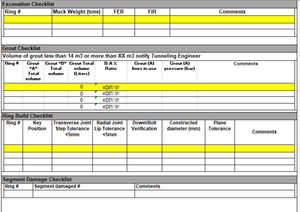
in cell B3 of sheet "Compiled Info" and it seems to return the expected result. The formula is spilled down within the dynamic table. However because of the merged cells in sheet "CoverPage" i find it difficult to help with this task.


- jdogg29Feb 22, 2023Brass Contributor
I have been playing around with this and actually for one field working on the compiled tab by using this formula - =IF('CoverPage'!$C$51=[@Ring],'CoverPage'!MuckWeight,"")
But the issue is that when the ring number on the cover page changes, it just disappears from the compiled tab. how can I get these to stay as a record? See my updated file attached please. Also, thank you both so much for the help with this!
- jdogg29Feb 22, 2023Brass ContributorPatrick2788 OliverScheurich Can either of you help me out with this?
- OliverScheurichFeb 23, 2023Gold Contributor
Hello,
instead of an IF command i've tried this formula
=IFERROR(INDEX(CoverPage!$I$51:$I$53,MATCH([@Ring],CoverPage!$C$51:$C$53,0)),"")
in cell B3 of sheet "Compiled Info" and it seems to return the expected result. The formula is spilled down within the dynamic table. However because of the merged cells in sheet "CoverPage" i find it difficult to help with this task.
- jdogg29Feb 22, 2023Brass Contributorok, so how do I do that? I have never worked with VBA before.
It is ok if the data that one inspector is still there, he can just delete it and update it with new info. as long as when they type in the ring number, the info on that report is tied to that ring # on the compiles sheet.