Forum Discussion

Profit Formula Challenge
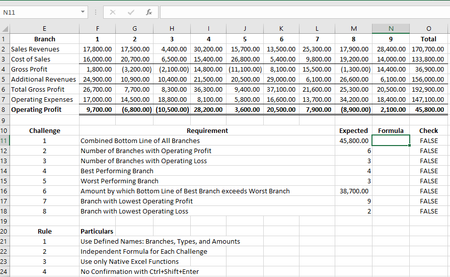
- Dec 31, 2020
Don't forget that Twifoo intended the challenge to be an examination of the use of advanced array methods available within traditional Excel. The dislike of CSE is understandable but is simply a by-product of the user-interface design.
As I noted earlier, I had trained myself to commit all formulas with CSE but I would have preferred not to need it. For some reason my proposal to reverse the conventions, that is to use CSE to introduce the additional implicit intersection step and use Enter to allow the calculation to proceed as a simple array operation was not well-received 🙂
I share the views of SergeiBaklan and Twifoo in that I see no need to avoid {1,-1,1,-1} as an array constant on the grounds that the notation is similar to the CSE notation. The array constant is an important element of array calculation. They need to be used with care, not because they are arrays, but because they are constants. If there exists a possibility that they may change, a named variable would be more appropriate than a constant embedded within a formula.

I apologise for the second link to the video clip. It was still in the paste buffer from last night and I don't seem to have an opportunity to edit it out of the message.
I am curious to see what challenge part #9 might involve.

 keenadviceJan 06, 2021Brass Contributor
Hi Twifoo
Do you have a solution for #9 and #10? I am dying to see yours. At the same time I am keen to post the solution I worked up and compare (although it may not be as neat as yours, having given myself the extra constraint of no {}). We can always learn from each other - that's the beauty of these things.
Based on the other challenges the correct form seems to be: I'll show you mine if you show me yours.
Do you have a solution?
- PeterBartholomew1Dec 31, 2020Silver Contributor
Agreed.
Happy New Year 2021 to you and others here.
There is plenty of room for improvement over 2020 for most!
 lori_mDec 31, 2020Iron Contributor
Glad these old posts inspired you to post a challenge such as this which has generated many interesting replies!
Yes these exercises are mostly academic but can be fun. If you want to pursue these techniques further I'd suggest looking at Jupyter Notebooks (Python or R) which now provide a great way to do interactive analysis on arrays and are increasingly used in the financial modelling community
horses for courses. For generic functions Ithat have been well tested performance is a consideration so I'd avoid LET in this instance. Best wishes for 2021!!
- PeterBartholomew1Dec 31, 2020Silver Contributor
Neat. I tend to specialise in the longwinded and prosaic!
= LAMBDA(matrix,
    LET(
      n, COLUMNS(matrix),
      k, SEQUENCE(n,,1,0),
      M, IF(ISNUMBER(matrix), matrix, 0),
    MMULT(M,k)))
No prizes for brevity for me. I am still waiting for the functionality to be enabled on my 365 licence.
The other strategy I had wondered about was to use INDEX to select a specific row and then call the function recursively. Once all the rows are visited, a blank result column is created and, following each return, the already calculated sum is inserted into place within the column.
One day, I will be able to try out these ideas!
- lori_mDec 31, 2020Iron Contributor
Agree that it's not much of a stretch to apply MMULT once the initial barrier of dynamic arrays is overcome. The main issue in my experience is that Excel is not consistent over function input types which can lead to confusion over what to expect functions to return. For example one might expect the N function with a range as input to spill when it actually needs to be converted to an array as in the formula at the bottom of this post.
PeterBartholomew1"In this respect" was omitted from your quote which places that statement in a context relative to other array operations such as broadcasting and lifting - see comment above. Matrices (and sets) can be studied at different levels, as you say, but the basic rules of computation as studied in high schools these days should be sufficient here (not the representation as a general linear transformation as covered in uni courses). Obviously familiarity with techniques of application only comes with practice though now with the introduction of LAMBDA implementation can become standardised rendering technical details less of an issue.
Take as an example a function that returns an array of column sums (allowing for blanks or text in the data range like SUM formulas do). The named formula below may appear tricky but if one gets used to just entering =SUMCOLS(range) in any given cell one can treat just as any other built-in function,
SUMCOLS:=LAMBDA(matrix,MMULT(1^TRANSPOSE(ROW(matrix)),N(+matrix))) - PeterBartholomew1Dec 31, 2020Silver Contributor
I would gladly chuck the (FAST) 'rule of thumb' out of the window. It is an irrelevant measure, since it captures neither complexity nor transparency with any precision. I found that I would completely reverse about 25% of the FAST standard to achieve what I consider better practice, starting with 'Do NOT create calculation blocks, always reference data at source. On a more positive note, I was happy to go along with about 75% of the standard!
- PeterBartholomew1Dec 31, 2020Silver Contributor
Hi Lori
<MMULT is a fairly straightforward operation requiring no more than high school mathematics>
I think you may be overstating the simplicity of matrix multiplication. I seem to remember encountering matrix theory in the first year at uni. Mind you, it is possibly incorrect to equate the complexity of a subject with ones age when first encountering it. I also was introduced to set theory at university; now it is taught at kindergarten!
I followed your link back to the XOR LX site. There again, I would have cheated and gone for the geometric mean of the annual growth
=(Y[2013]/Y[2010])^(1/3)-1
and, in so doing, missed out on all the cunning Excel tricks.
=INDEX(SORT(IF({1,0},Y[2013]/Y[2010],Y[Region]),,-1),1,2)
Of course, using structured references would have got me drummed out of the Brownies, despite the fact that the formula is marginally longer that with direct references.
One thing that modern excel provides is the SORT function which brings the treasure to the surface.
Now with the LAMBDA function, you should be able to roll-your-own multidimensional arrays such as
UNITS(region, sector, timeperiod)

where the UNITS refers to a LAMBA to access the data column 'Memory'

= LAMBDA(k₁, k₂, k₃,
    LET(
      p, n₂*n₃*k₁ + n₃*k₂ + k₃ + 1,
      V, INDEX(Memory, p),
    V) )
The next challenge would be a further function to sum over a selected index or, more advanced to bring varying sales prices/region into the summation.
- keenadviceDec 31, 2020Brass Contributor
lori_m what should probably be preferred, in all situations, is this
https://www.linkedin.com/pulse/long-formulas-excel-horror-mark-robson/
With Twifoo's brain-stretching challenge we are operating in a rareified and artificial atomosphere today, where financial modelling's most basic 'rule of thumb' has gone out the window anyway
- keenadviceDec 31, 2020Brass Contributor
Twifoo I got my solution for challenge #9 down to 173 characters
But yes, lost any ability to use * wildcards (makes it a fraction longer but also clearer I feel)
I'd be interested to see your solution
- keenadviceDec 31, 2020Brass Contributor
I'm interested to see your solution Twifoo.
For challenge #9 (list of top 5 performing branches listed in order of profitablity) I've got it down to 173 characters, avoiding {} and, at the same time, demonstrating the potential value of the new dynamic array functions Let, Sequence, Switch and Sort.
I'll be interested in your result (and yes, you do make it much easier on yourself if you use {} as a shortcut to force your embedded functions to run, just leaving the outer 'shell' as the dynamic array - I appreciate you're not up for that particular challenge!!).
- SergeiBaklanDec 31, 2020Diamond Contributor
I didn't say MMULT is complex and require extra skills, I only tried to say it didn't use so widely before DA.
- TwifooDec 31, 2020Silver ContributorYou're absolutely right! I certainly learned plenty of techniques from your astounding insights therein before posting a formula challenge like those even crossed my mind. I recommend readers of this thread to study your contributions therein just like I did.
- lori_mDec 31, 2020Iron Contributor
Twifoo I have been one of those following this thread with some interest having enjoyed these kinds of challenges in the past and I concur that an array constant should be preferred to a CHOOSE construction unless of course some of the elements may be variable. Perhaps one of the first instances of a formula similar to your proposed solution was here . Now, in the latest version, XLOOKUP may be used in place of that LOOKUP/FREQUENCY combination.
SergeiBaklan With dynamic arrays MMULT becomes standard operation
Indeed Dynamic arrays extend Excel to operate like other array programming languages with operations such as lifting and broadcasting (but without advanced concepts like multidimensional arrays and tensor products). In this respect MMULT is a fairly straight forward operation requiring no more than high school-level mathematics. - TwifooDec 31, 2020Silver ContributorWell explained, PeterBartholomew1 . Array constants must not be avoided, but must be used with care, not because they are arrays, but because they are constants!
- TwifooDec 31, 2020Silver Contributor
I still refuse to avoid the use of curly brackets! They house the wildcards I used in my formulas.
- PeterBartholomew1Dec 31, 2020Silver Contributor
Don't forget that Twifoo intended the challenge to be an examination of the use of advanced array methods available within traditional Excel. The dislike of CSE is understandable but is simply a by-product of the user-interface design.
As I noted earlier, I had trained myself to commit all formulas with CSE but I would have preferred not to need it. For some reason my proposal to reverse the conventions, that is to use CSE to introduce the additional implicit intersection step and use Enter to allow the calculation to proceed as a simple array operation was not well-received 🙂
I share the views of SergeiBaklan and Twifoo in that I see no need to avoid {1,-1,1,-1} as an array constant on the grounds that the notation is similar to the CSE notation. The array constant is an important element of array calculation. They need to be used with care, not because they are arrays, but because they are constants. If there exists a possibility that they may change, a named variable would be more appropriate than a constant embedded within a formula.
- keenadviceDec 31, 2020Brass Contributor
Expected result for challenge #9 is
28,200
20,500
9,700
7,900
3,600
Expected result for challenge #10 includes the branch number on the left hand column
4 28,200
6 20,500
1 9,700
7 7,900
5 3,600
If you really want to test your mastery of dynamic arrays, I think that completely eliminating the (now old, 'hard') curly bracket arrays becomes a truer challenge. You can either do it, or not.
But if you stop to think about it for a second, completely eliminating {} should not be at all difficult. Something like ={1,-1,1,-1} in 'old money' just becomes something like =CHOOSE(SEQUENCE(1,4),1,-1,1,-1) in 'new money' - maybe highlighting the everyday usefulness of the new dynamc array sequence function?
Maybe try both ways, with and without {}? If only to demonstrate to the world your belief that {} will enhance efficiency, reduce formula length and continue to persist in the new dynamic array world?
- SergeiBaklanDec 30, 2020Diamond Contributor
What's the difference between array constant and non-array constant? Constant is constant. It's hardcoded into the formulae or defined in grid, IMHO that's the only point.
- TwifooDec 30, 2020Silver ContributorWhat's the expected result? I refuse to avoid the use of array constants because doing so will impose an additional rule, which I consider as more appropriate for a separate discussion, not here.
- keenadviceDec 30, 2020Brass Contributor
Congrats PeterBartholomew1 - you've also achieved what was going to be my challenge #10 - slotting the branch numbers in alongside the profit results!
Of course any challenge like this becomes an artificial puzzle (to see what you can do if you limit yourself making use of the new dynamic array functions) when, in real life, you could often get there more simply if you were prepared to use an extra column or row and fill.
I think the puzzle does become a notch more challenging if you refuse to allow yourself the ability to use any curly brackets {} at all, and also look to take yourself through a process that reduces down the number of functions used (which has the side impact of reducing character count).
Well done!
- keenadviceDec 30, 2020Brass Contributor
I mean one answer entered in one cell only
- PeterBartholomew1Dec 30, 2020Silver Contributor
As with Twifoo's challenge, I have addressed the problem, but not the challenge which requires the use of specific techniques. Also, I have made no attempt to minimise the character count.
= LET( typesAbbr, {"S*","C*","A*","O*"}, branchNum, SEQUENCE(9), crosstab, SUMIFS(Amounts, Types, typesAbbr, Branches, branchNum), OperatingProfit, IF({0,1}, MMULT(crosstab, SignCashFlow), branchNum), k, {1;2;3;4;5}, ordered, SORT(OperatingProfit,2,-1), INDEX(ordered, k, {1,2}) ) - TwifooDec 30, 2020Silver ContributorDo you mean that those five answers will be entered in five cells but using the same formula, copied down to the next four cells? My challenges required only one answer entered in one cell.
- keenadviceDec 30, 2020Brass Contributor
OK here it is - challenge #9 - so glad you're up for it!
It's very easy to describe - 'simply' list out the profits from the 5 top-performing branches
So the answer, of course, looks like this:
28,200
20,500
9,700
7,900
3,600
The trick is to complete the challenge complying with @twifoo's original constraints (using the original lists of data in columns A, B & C, making use of native Excel 365 functionality, with the result produced by a formula entered into one cell and without ever pressing "Ctrl shift enter"). Plus, to make it even more fun, this time there are no 'forced' array formulas allowed in the result at all (i.e no curly brackets allowed at all).
I have struggled to get the result down to less than 200 characters - and I'm not seeing it as perfect, so I expect there is room for improvement.
Good luck!
(PS - to achieve my result, I have had to use a handful of the Excel functions released in the last year, so I think it becomes a real test of your grasp of the new advances)
