Forum Discussion

Profit Formula Challenge
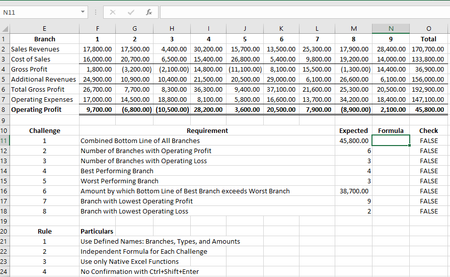
- Dec 31, 2020
Don't forget that Twifoo intended the challenge to be an examination of the use of advanced array methods available within traditional Excel. The dislike of CSE is understandable but is simply a by-product of the user-interface design.
As I noted earlier, I had trained myself to commit all formulas with CSE but I would have preferred not to need it. For some reason my proposal to reverse the conventions, that is to use CSE to introduce the additional implicit intersection step and use Enter to allow the calculation to proceed as a simple array operation was not well-received 🙂
I share the views of SergeiBaklan and Twifoo in that I see no need to avoid {1,-1,1,-1} as an array constant on the grounds that the notation is similar to the CSE notation. The array constant is an important element of array calculation. They need to be used with care, not because they are arrays, but because they are constants. If there exists a possibility that they may change, a named variable would be more appropriate than a constant embedded within a formula.

It always amazes me how much can be achieved by traditional Excel in the hands of a master! Given how different my objectives are from those assumed by your challenge it is perhaps surprising that there is as much commonality in our approaches as appears the case. You calculate the basic matrix as the transpose of that printed as a table but maybe that fits the MMULT formulas better. The main difference in the selection of functions appears to be your use of FREQUENCY. I tend to reserve it for stats calculations but it appears to have much wider application.
As an Excel 365 user, SUMPRODUCT as an array wrapper is history and I have no way of testing which functions shared its magic properties (AGGREGATE for one?). I think we are reaching the point at which 365 is no longer best regarded as spreadsheet software, more an interactive programming environment that just happens to be capable of running legacy spreadsheets.
If only I had LAMBDA, it is starting to be annoying!

PeterBartholomew1 , that's philosophic discussion about how to work with Excel. Twifoo demonstrated amazing technique, however most probably I won't use it literally in real projects. Mainly due to simplicity of the maintenance, plus I don't care if formula will be 130 character length or 430 characters. Main point is how easy will be to modify entire reporting module if source data structure or naming will be slightly changed.
Excel is not the grid only, and it's not the programming language. The power of Excel is in combination of one and another. And here is always will be a compromise to be mostly on one or another site. With introduction of lambdas, even assuming its ugly name manger approach and lack of lambda management will be improved, I don't see the reason why shall we avoid such functions as AGGREGATE(), and, more common, tricks which Twifoo demonstrated, at all. Moreover, LET() and LAMBDA() assumes active namings, and that not always good in maintenance. I know you are on "names only" approach, nothing personal. But from time to time I work with other people workbooks where what concrete name means is obvious only for the author of such workbook, and I spend lot of time to understand all these names and modify where required.
Simple example, let I have =SUM(A1:A10). To modify on =SUM(A1:A11) I simply drag the range on one cell more. If the same is done with UDF, lambda and/or names, modification takes more time. (Yes, I know about dynamic ranges, sample could be not good, but that's first in mind).
Please take me correctly, I'm not against one or another, I'm against using of only this or only another, other words for compromise. Let use advantages of new functionality and simplicity, where applicable, of old one.
- PeterBartholomew1Dec 27, 2020Silver Contributor
<I have =SUM(A1:A10). To modify =SUM(A1:A11) I simply drag the range on one cell>
I am not sure you have made the point! I agree completely that the modification is quick and easy ('cheap and cheerful' is another English expression that may apply).
It is also highly prone to error; I might forget to make the change. Also, there is nothing to indicate how big the range should be (Rogoff and Reinhart). I would argue that it is a recipe for error and, possibly, a significant contributor to the fact that fewer than one in ten spreadsheets are sufficiently free of error so as to be usable.
- PeterBartholomew1Dec 26, 2020Silver Contributor
I hope I did not appear to dismiss Twifoo's achievement too lightly; that was not my intention! I recognise the achievement of putting together a solution from AGGREGATE( {14,15}, ...) , FREQUENCY(...), MMULT(...) as something that few could manage (and a disproportionate number of those are probably to be found amongst your MVP peers).
I probably do go on too much promulgating my alternative view of spreadsheets, but it results from years of swimming against the tide of 'tips and tricks', that are primarily aimed at ways of creating spreadsheets faster (but not necessarily better). I encountered dogmatic statements from financial modellers decrying the use of defined Names or array formula (e.g. the FAST standard). At the same time, I have watched ModellOff contestants at work and admired the fluency with which they manipulate spreadsheets and freely admit, I couldn't come anywhere close.
Having formed a view that ran counter to most received wisdom (mainly regarding the use of named formulas and arrays) I campaigned for a few years (2016-2018) for an improved experience for manipulating arrays, in place of CSE which was dire. I had envisaged an Array object (much like a table) which would respond dynamically to change. I was assured that change was coming and I would like it but, in the event, what JoeMcDaid delivered was far superior (I no longer felt like a lone voice in the wilderness since his team were clearly ahead of me).
The diversity of solution approaches now possible within Excel as a single software system is staggering. But then, if one looks at the VBA side of the house, solutions vary from basic macro recorder (with its multiplicity of 'selects') through to centralised error trapping (such as that offered by Craig Hatmaker or Bovey et al) combined with Classes and associated methods.