Forum Discussion

Pivot Table group positive and negative data
- Jun 28, 2023
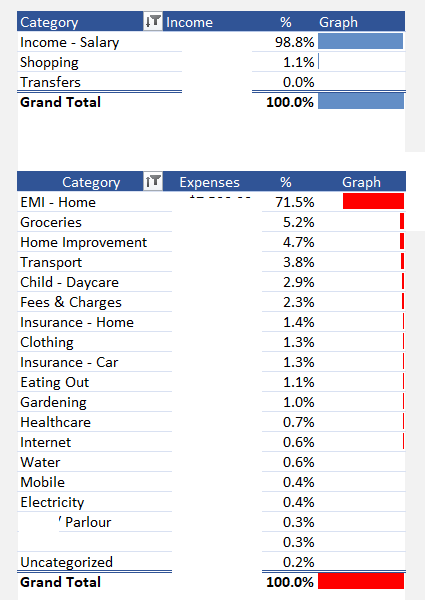
Attached an example with a single [Amount] column with Positive & Negative values:
Edit the query in the attachment and follow the steps in APPLIED STEPS (all done with the UI). Once you've separated your [Income] & [Expense] (the added Custom steps) and removed [Amount] that's no longer necessary, right-click on column [Category] and in the drop-down menu select Unpivot Other Columns
IMPORTANT:
- For [Expense] you'll see I used function Number.Abs to convert to negative [Amount]s to positive. If you want your Expense to show negative in your PivotTable then remove Number.Abs (you will have to adjust the Graph DAX measure)
- When you add Custom Columns [Income] & [Expense] Power Query doesn't auto. Type the columns. Taking ex. [Income] when you create it, it displays exactly as below in PQ formula bar:
You must edit the formula and add, before ): , type number then Validate:
You must do the same for the [Expense] column
Reason is: default data Type in Power Query is Type any. Column(s) of Type any loaded to the Excel Data Model will be assigned the Type Text (no Sum, Avg... possible)


Thanks for your quick response. Could you please let me know how you carried out unpivoting step which resulted in categorizing the data as rows and columns.
Also, my raw data has a single column of income and expenses, income in positive values and expense as negative values. Does this mean i need to split them into separate column, positive and negative and then carryout your method? Appreciate your support on this.