Forum Discussion

Need to search multiple words in a cell and get the output based on the word found.
- Jun 27, 2021
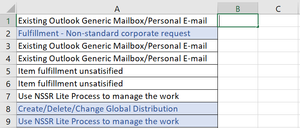
If you have Excel 2019 or Excel in Microsoft 365, enter the following formula in B1:
=TEXTJOIN(", ",TRUE,IF(ISNUMBER(SEARCH({"Generic Mailbox","Distribution","Non-standard","NSSR"},A1)),{"Shared Mailbox","DL","Corporate Request","Non-Standard Service Request"},""))
This allows for more than one of the search terms in a cell.
Otherwise:
=IFERROR(INDEX({"Shared Mailbox","DL","Corporate Request","Non-Standard Service Request"},MATCH(TRUE,ISNUMBER(SEARCH({"Generic Mailbox","Distribution","Non-standard","NSSR"},A1)),0)),"")
Fill down from B1.

This discussion was about returning multiple words if the cell being searched contained more than one of the keywords. I get the impression that you want to return only one word. Is that correct?

- _L_C_Mar 13, 2023Copper ContributorThanks so much Hans. You are a lifesaver!
- HansVogelaarMar 13, 2023MVP
That requires a different formula. See the attached demo workbook.