Forum Discussion

Need to search multiple words in a cell and get the output based on the word found.
- Jun 27, 2021
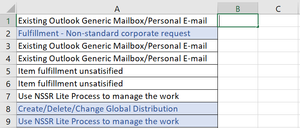
If you have Excel 2019 or Excel in Microsoft 365, enter the following formula in B1:
=TEXTJOIN(", ",TRUE,IF(ISNUMBER(SEARCH({"Generic Mailbox","Distribution","Non-standard","NSSR"},A1)),{"Shared Mailbox","DL","Corporate Request","Non-Standard Service Request"},""))
This allows for more than one of the search terms in a cell.
Otherwise:
=IFERROR(INDEX({"Shared Mailbox","DL","Corporate Request","Non-Standard Service Request"},MATCH(TRUE,ISNUMBER(SEARCH({"Generic Mailbox","Distribution","Non-standard","NSSR"},A1)),0)),"")
Fill down from B1.

I have one other excel template I am struggling with, it is a linear interpolation calculator that will formulate a table based off of interpolated values.
I attached a pic below, essentially, I want to take the data from the table on the left, and I want to find the Flow at every 1 PSI between the two interpolated values in the table. Example, for the first set it is between 70.41 & 66.66, so I want to find flow at 70, 69, 68 & 67. Then 66.66 is already there and I would continue on down to 66, 65 and so on...
I feel like I'll use the round down function to create an Array, but I am not sure. Any help is appreciated!!

- SBays123Feb 01, 2023Copper Contributor
- HansVogelaarFeb 01, 2023MVP
SBays123 Given a PSI (70, 69, ...), the formula looks for the next lower and next higher PSI in the table on the left. It uses these to look up the Flow values corresponding to those PSIs.
Finally, it finds the Flow for the given PSI by linear interpolation.
I designed the formula by creating separate formulas for each of the parts first, then combining them into one monster formula,
- SBays123Feb 01, 2023Copper Contributor
I believe this is working correctly for what I need, are you able to briefly explain the formula? I get the XLOOKUP function searches for a value in an array and it is outputting the nearest value, but i am struggling where you got the function from that adds, subtracts, divides, and multiplies all the XLOOKUPs.
- HansVogelaarJan 31, 2023MVP
The attached sample workbook uses dynamic array formulas available in Excel in Microsoft 365 and Office 2021, and in Excel Online.
- SBays123Jan 31, 2023Copper ContributorLong story short yes that is fine as long as the interpolation points are updated as you get into the different ranges.
- SBays123Jan 31, 2023Copper Contributor
As long as the table on the right has PSI values from the max (in this case 70.41) down to the min (6.81) in increments of 1 PSI that will work fine. BUT the tricky part is ensuring that the interpolation formula is being updated as you go from one range to another.
For example, from 70.41 down to 66.66 you will use the first two corresponding Y-values (0 & 759.4), but once you get to 66.66 and until you get to 63.48 you will need the corresponding Y-values of 759.4 & 1015.24.
I dont necessarily need all the PSI values on the left to be on the right, as long as the interpolation function corresponds is updated with the next set of table data as you get into the new ranges thats all that matters.
Hopefully that makes sense.
- HansVogelaarJan 31, 2023MVP
Do you really need the table on the right to include all the PSI's from the table on the left?
Or would it be OK to list just the Flow for the integer PSI values 70, 69, ..., 7?
- SBays123Jan 31, 2023Copper Contributor