Forum Discussion

MDMorse
May 23, 2023Copper Contributor
Merge Empty Data
In the spreadsheet below, I'm trying to remove duplicate "CPT Code" data, merging "Office Fee" and "Facility Fee" into one line for each CPT Code. Note that there are some codes, like 11960 that don...
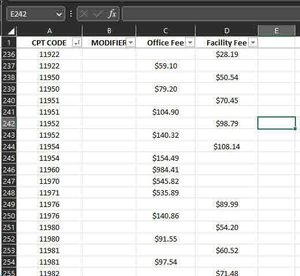
- May 23, 2023
Here is a macro you can run. Please test on a copy of the worksheet!
Sub MergeRows()
    Dim s As Long
    Dim m As Long
    Dim t As Long
    Dim c As Long
    Dim vs As Variant
    Dim vt As Variant
    m = Range("A" & Rows.Count).End(xlUp).Row
    vs = Range("A1:D" & m).Value
    ReDim vt(1 To m, 1 To 4)
    For c = 1 To 4
        vt(1, c) = vs(1, c)
    Next c
    t = 1
    For s = 2 To m
        If vs(s, 1) <> vs(s - 1, 1) Then
            t = t + 1
            For c = 1 To 4
                vt(t, c) = vs(s, c)
            Next c
        Else
            vt(t, 3) = vs(s, 3)
        End If
    Next s
    Range("A1:D" & m).Value = vt
End Sub

HansVogelaar
May 23, 2023MVP
Here is a macro you can run. Please test on a copy of the worksheet!
Sub MergeRows()
    Dim s As Long
    Dim m As Long
    Dim t As Long
    Dim c As Long
    Dim vs As Variant
    Dim vt As Variant
    m = Range("A" & Rows.Count).End(xlUp).Row
    vs = Range("A1:D" & m).Value
    ReDim vt(1 To m, 1 To 4)
    For c = 1 To 4
        vt(1, c) = vs(1, c)
    Next c
    t = 1
    For s = 2 To m
        If vs(s, 1) <> vs(s - 1, 1) Then
            t = t + 1
            For c = 1 To 4
                vt(t, c) = vs(s, c)
            Next c
        Else
            vt(t, 3) = vs(s, 3)
        End If
    Next s
    Range("A1:D" & m).Value = vt
End Sub MDMorseAug 18, 2023Copper ContributorThanks so much for this!