Forum Discussion

JosephA1915
Jul 04, 2021Copper Contributor
Merge Data From Two Sheets in Same Workbook and Sort
macOS Catalina/Excel for Mac 16.50 Hello. What is the best way to merge data from two (or more) sheets in the same workbook onto a "Summary" sheet and then sort by the data in the first column (...
- Jul 05, 2021
I don't know how exactly your data is structured, for that better to have sample file. Assume you have two structured tables, they could be in different sheets. If ranges, you may convert them to tables by Ctrl+T or use named ranges. Something like this
To join these tables you may use formula as
=LET(
  rowsOne, ROWS(Table1),
  rowsTwo, ROWS(Table2),
  c,       SEQUENCE(,COLUMNS(Table1)),
  hMerge, LET(
   k, SEQUENCE(rowsOne+rowsTwo),
   IF(k<=rowsOne,
      INDEX(Table1, k, c),
      INDEX(Table2, k-rowsOne, c))
 ),
 SORT(hMerge)
)
and instead of Table1, Table2 use names of your actual tables or ranges.

SergeiBaklan
Jul 06, 2021Diamond Contributor
In A1 of Summary sheet

JosephA1915
Jul 06, 2021Copper Contributor
- SergeiBaklanJul 12, 2021Diamond Contributor
JosephA1915 , you are welcome
- JosephA1915Jul 12, 2021Copper ContributorSorry, I didn't notice that those two dates were 2020. Thank you for pointing that out and thank you for all of your help on this. It works great!!
- SergeiBaklanJul 09, 2021Diamond Contributor
Sorry, I didn't catch. What I see in file
May 2020 is earlier than June 2020 and both are earlier than Jan 2021.
- JosephA1915Jul 08, 2021Copper Contributor
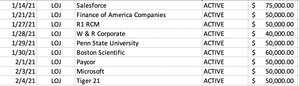
Thank you. It looks like this is going to work. It seems there is some sort of glitch. Take a look at the first two rows. It doesn't seem like they're sorted correctly (by date).
Thank you,
Joseph
- SergeiBaklanJul 06, 2021Diamond Contributor