Forum Discussion

Macro VBA Excel - Conditioned copy of reference cell to a range of side cells
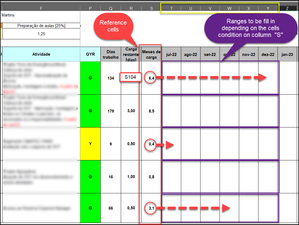
- Jul 30, 2022
Sub Copiar()
    Dim r As Long
    Dim n As Long
    Application.ScreenUpdating = False
    For r = 104 To 108
        n = Application.RoundUp(Range("S" & r).Value, 0)
        If n <= 0 Then
            n = 1
        ElseIf n > 6 Then
            n = 6
        End If
        Range("T" & r).Resize(1, n).Value = Range("S" & r).Value
    Next r
    Application.ScreenUpdating = True
End Sub
Remark: a line such as
If Range("S104") > 1 <= 2 Then
is not valid. It should be
If Range("S104") >1 And Range("S104") <= 2 Then

1) Will the range always begin in row 104?
> No, it will start in row 8.
2) Is the range to be processed the last used range on the sheet, or are there other non-empty rows below it?
> There are other non-empty rows below it. Due they have some fixed values instead to be calculated.
Thanks Hans!

Thanks. That means we'll need another way to determine the last row to be processed. How can we do that?
- LeonelAFMAug 10, 2022Copper ContributorThank you one more time my friend!!
- HansVogelaarAug 09, 2022MVP
Book:
Excel VBA Programming for Dummies (don't be put off by the title, it is a seriously helpful book)
Website:
- LeonelAFMAug 09, 2022Copper ContributorMAGNIFICENT, Hans!!!!!!!!!!!!!!!!
Macro is perfectly working!!!!
Could you indicate me a good book to learn VBA?
Thank you very much for your support!!!!! - HansVogelaarAug 09, 2022MVP
Change line #14 of the code to
Range("T" & r).Resize(1, n).Value = Range("R" & r).Value / n - LeonelAFMAug 09, 2022Copper Contributor
Hi Hans!
I tested it and worked without issues copying all figures in the right numbers of positions.However, I made a mistake copying the wrong figures.
Because It copies the months of work instead the working days remaining distributed along those months of work. I mean: I wanted to copy (working remaining days divided by full working month) and copying the result on number of cells relating to full working month. See the picture for a better understanding.Thanks for your patience!
- HansVogelaarAug 07, 2022MVP
Get well soon!
- LeonelAFMAug 07, 2022Copper ContributorHi Hans,
Unfortunately, until now, I could not test it 'cause after my fourth shot on Covid-19 vaccine got a hard side effect and now recovering. As soon as I test it, will let you know.
Thanks for your support. - HansVogelaarAug 01, 2022MVP
Thanks. Try this version:
Sub Copiar() Dim r As Long Dim m As Long Dim n As Long Application.ScreenUpdating = False m = Range("D:D").Find(What:="Educacional", LookAt:=xlWhole).Row For r = 8 To m - 1 n = Application.RoundUp(Range("S" & r).Value, 0) If n <= 0 Then n = 1 ElseIf n > 6 Then n = 6 End If Range("T" & r).Resize(1, n).Value = Range("S" & r).Value Next r Application.ScreenUpdating = True End Sub - LeonelAFMAug 01, 2022Copper Contributor
Hi Hans!
I think we could use the word "Educacional" as an index on collumn "D". So, every part of workbook being up to this first row found by the macro command will be the macro range.See the attachment.
Thanks a lot for your support!

