Forum Discussion

yennek
Dec 11, 2022Copper Contributor
How to sort the unique() values by their sumifs()
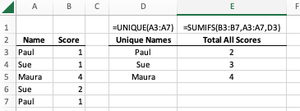
From a large data set, I’m generating a list of unique names with =UNIQUE(...). Next to those unique names there’s a simple =SUMIFS(...) giving the totals. All is good. I can use =Sort(Unique(...)) t...
- Dec 12, 2022
yennek All you can do in a single formula. Try the following formula.
=SORT(HSTACK(UNIQUE(A3:A7),SUMIFS(B3:B7,A3:A7,UNIQUE(A3:A7))),2,-1)See the attached file.


Patrick2788
Dec 12, 2022Silver Contributor
This workaround is good for some basic stacking:
=SORT(IF({1,0},UNIQUE(A3:A7),SUMIFS(B3:B7,A3:A7,UNIQUE(A3:A7))),2,-1)

yennek
Dec 13, 2022Copper Contributor
This is helpful thank you.