Forum Discussion

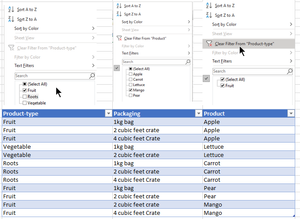
How to get intended result, issue with clear-filter not working correctly/as expected in tables.
- Mar 14, 2023
Hi ArnoldH99
yes, it's really worth to have a closer look at slicers, because they are much more user friendly then regular filters.
There are also some options to customize them, so you could arrange them also horizontally by specifying the number of columns that you want to have in a row:
So if you reserve a few rows above you table and also freeze the panes to keep the header row visible, you should have always access to the slicers.
There is even a way to hide/unhide them. Just activate the selection pane (menu "Home | Find & Select | Selection Pane...").
This pane will not only show slicers, but any other objects like charts or shapes. By clicking on the little eye-icon you can hide or unhide the object:

Hi ArnoldH99
yes, it's really worth to have a closer look at slicers, because they are much more user friendly then regular filters.
There are also some options to customize them, so you could arrange them also horizontally by specifying the number of columns that you want to have in a row:
So if you reserve a few rows above you table and also freeze the panes to keep the header row visible, you should have always access to the slicers.
There is even a way to hide/unhide them. Just activate the selection pane (menu "Home | Find & Select | Selection Pane...").
This pane will not only show slicers, but any other objects like charts or shapes. By clicking on the little eye-icon you can hide or unhide the object:

Didn't find any reference to the use of slicers when looking for alternatives/options for my filter-options/issues. Consider myself as reasonable good finder (:-)).