Forum Discussion

How to create an Insurance Coverage Chart (Treemap?)
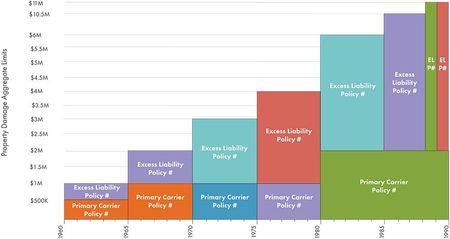


Sample attached. I need Amounts on the left axis, dates (years or quarter years) on bottom axis, then boxes for the policies to include name of insurance company, policy number, amount and specific date (although if I can just get name and policy number, I can add in other details after table is generated, I suppose). IDEALLY, each insurance company should have it's own color, but, of course, I can do that manually after the fact.
GOOD LUCK!!!!! HOPING YOU CAN FIGURE IT OUT!!!!
- CheugyJul 01, 2021Copper Contributor
Hi ilenea
I think you stumped me on this one -_-
I reformatted the data and tried to replicate the treemap using stacked bar graphs. The overlaps and the large differences in pricing really made the data less meaningful. To visualize a value on y-axis and chronological x-axis, I think a scatter plot, heatmap, or line graph would be more meaningful and easier to do. I think with the current core functionality of excel, this wouldn't be possible without using a VBA script.
Maybe some other brain child on here can help, sorry, tried my best 😕 Good luck!
- ileneaJul 01, 2021Copper ContributorThank you for trying! I take comfort knowing that I'm not the only one stumped on this! One of us should write a program, lol! Looks like I'm going to be doing an art project manually (like we've done in the past)!