Forum Discussion

gtsmith2
May 25, 2021Copper Contributor
Help with multiple conditional statements in Excel
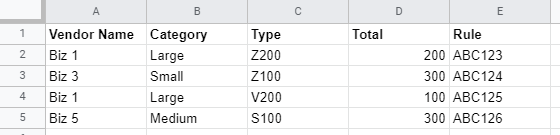
Below is an example of a much larger dataset that I am working with. What I am having trouble figuring out is how to write a formula that does the following: Find a certain “Vendor Name” in column...
- May 26, 2021

gtsmith2
May 25, 2021Copper Contributor
Thank you so much!
Regarding my second question I'm thinking that the AGGREGATE function might work but I have not had any luck with it.
Regarding my second question I'm thinking that the AGGREGATE function might work but I have not had any luck with it.

HansVogelaar
May 25, 2021MVP
Assuming that the first formula is in row 2 (for example in H2):
=IFERROR(INDEX($E$2:$E$200, MATCH(1, ($E$2:$E$200<>"")*($A$2:$A$200=$G$2)*($D$2:$D$200=LARGE(IF(($E$2:$E$200<>"")*($A$2:$A$200=$G$2), $D$2:$D$200), ROW()-1)), 0)), "")
Fill down to row 6 (or however far you want).
- gtsmith2Jun 07, 2021Copper ContributorThank you for the help on this! This modification helps tremendously!
- HansVogelaarJun 03, 2021MVP
See the attached version. I inserted a helper column that adds a very small disturbance to the Total amounts. You can hide this column if you wish.
- gtsmith2Jun 02, 2021Copper ContributorHi Hans, so while I was finalizing my spreadsheet I noticed that the ties were a larger and more frequent problem than I first thought. Do you know of a way for the formulas that you created to handle ties. Basically some additional conditional logic that says if the "rule" is repeated then go to the next "rule" with the same total.
- gtsmith2May 27, 2021Copper ContributorThanks again! This works perfectly!
- HansVogelaarMay 26, 2021MVP
- gtsmith2May 26, 2021Copper ContributorThis works perfectly! Thank you again!
Based on having this setup I am thinking I would like to add some conditional logic on the "Category" and "Type" columns. Would that be a possible enhancement to the formulas provided in the sample workbook above? Thanks again! - HansVogelaarMay 26, 2021MVP
See the attached sample workbook.
- gtsmith2May 26, 2021Copper Contributor
The formula posted at 1:05pm works perfectly. The last formula posted for some reason I cannot get to work. It does not error but when the function is entered/run nothing populates in the cell. Any suggestions?