Forum Discussion

Freezing multiple rows
 Feb 28, 2019
Absolutely brilliant. Thank you so much. I've used Excel for more than 20 years and I'm pretty sure this method is new - or, at least, newish. But it's great to find out there really is a way. Thank you for pointing the way.

I have used excel for well over 40 years and I am advanced in excel and I use to be able to freeze what ever columns and rows I wanted and with my office 365 I have not been able to....I really think this needs a 2nd look at fixing the problem. My 365 will ONLY freeze the 1st row and that is a real problem for me. Can you take a 2nd look please.
Thank you, Patty

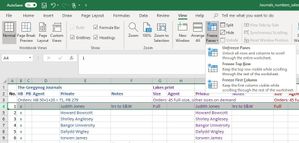
I was having major problems too, but I just worked it out! aaaaccountingnet. You only need to select one cell below the row and after the columns eg. I want A-C columns to stay, and 1-2 rows to stay. I first of all Unfreeze everything, then select D3 and Freeze frame. This worked thank goodness!
 jeffreydmcFeb 02, 2024Copper ContributorThank you!