Forum Discussion

Formulas and Functions
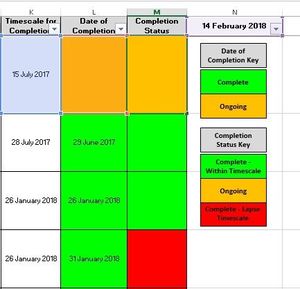

Once I figure it out I will post the formula.

If you want column M to turn red (R) when the K date has lapsed (which it will always do over time) regardless of what's in L, then this should work:
=IF(K2="","D",IF(L2="",IF(K2<NOW(),"R","A"),IF(K2<NOW(),"R",IF(K2<L2,"R","G"))))
- Aaron LockettFeb 15, 2018Brass Contributor
No this hasn't worked.
If the completion time scale lapse over the current date it should go red, if it is completed (Column L less than todays date) It should go green.
I only want Column M to go red if the date specified in Column K or L lapse over the current date.
If there is no date in Column L and the date in Column K has NOT lapsed over the current date then it should be Amber.
If the date in Column L is less than Column K it should go Green.
I apologise if I haven't explained this as best as I could have.
- SergeiBaklanFeb 15, 2018Diamond Contributor
Hi Aaron,
It will be much better if you provide sample Excel file instead of screenshot - to play with formulas we need to build the model from scratch based on your description. Bit time consuming.
- Aaron LockettFeb 15, 2018Brass Contributor
In the morning I will remove all confidential data and provide a sample for you.
Thanks.
