Forum Discussion

Anonymous
Apr 03, 2024Finding an appointment in Excel
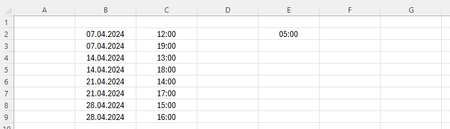
Hi there, I got a question for you. Imagine, in columns B and C I have the dates and times of my appointments. As you can see, I have two appointments per Sunday. Now, how can I in column G create a ...
- Apr 05, 2024
Deleted
Here is a first attempt. It may need additional tweaking.
Do not change the formulas in column D.
Anonymous
Apr 05, 2024Thanks again!
If I have 09:00 in D2, 10:00 in D3, and 17:00 in E2, it says "No results" in G2. However, as both 09:00 (D2) and 10:00 (D3) have 05:00 (E3) or more hours difference with 17:00 (E2), an appointment should be possible on this date.
A second question I have, how can I edit the formula in G2 so that it only lists dates within 365 days of today?
By the way, in D10:D13 I have entered 03:00 instead, so that appointments between 08:00 and 22:00 should be possible (when E3 remains 05:00).
Thank you in advance!
If I have 09:00 in D2, 10:00 in D3, and 17:00 in E2, it says "No results" in G2. However, as both 09:00 (D2) and 10:00 (D3) have 05:00 (E3) or more hours difference with 17:00 (E2), an appointment should be possible on this date.
A second question I have, how can I edit the formula in G2 so that it only lists dates within 365 days of today?
By the way, in D10:D13 I have entered 03:00 instead, so that appointments between 08:00 and 22:00 should be possible (when E3 remains 05:00).
Thank you in advance!

HansVogelaar
Apr 05, 2024MVP
Deleted
- You originally asked to determine whether there was enough time before the earliest appointment on a day for a new appointment. The desired appointment time was before the existing appointments.
- Now you specify a desired appointment time after the existing appointments. So you apparently want something else. Please clarify.
- AnonymousApr 05, 2024Please do accept my apologies for the confusion. I have various appointments on a particular weekday. Sometimes one, other times more. Clients ask for an appointment at a certain time. Then I’d like to fill out this time in E2 and then get a list in the G column on which dates I still have room for this appointment with at least 5 (or whatever I’ve filled out in E3) hours between the start time of appointments. So, if I have an appointment at 14:00, the appointment before cannot start later than 09:00 and the one after cannot start earlier than 19:00. In the columns B and C, I fill out the dates and times I already have appointments. However, when a weekday is not listed there, that means I’m available, so these dates should also appear in the G column. The list in the G column should only propose dates within 365 days of today. Thanks again for your help. It is much appreciated.
- HansVogelaarApr 05, 2024MVP
Deleted
Is 22:00 the latest time an appointment can end, or is it the latest time an appointment can begin?
- AnonymousApr 05, 2024With having 02:00 o’clock for dates that I don’t have an appointment for yet (C10:C13) and with having 05:00 (E3) hours between the start times of appointments, start times of appointments are between 07:00 and 21:00 o’clock. So, 21:00 o’clock is the latest time an appointment can begin.