Forum Discussion

FIFO Inventory Formula Challenge
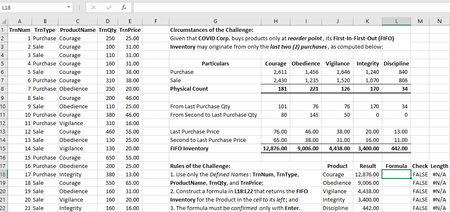

With that straightforward formula could be like
=SUM(
  INDEX(TrnPrice,
            AGGREGATE(14,6,1/(ProductName=$J20)/(TrnType="Purchase")*TrnNum,{1;2}),
            0)*
  CHOOSE({1;2},
              MIN(
                    INDEX(TrnQty,
                                  AGGREGATE(14,6,1/(ProductName=$J20)/(TrnType="Purchase")*TrnNum,1),
                      0),
                    SUM(TrnQty*(1-EVEN(TrnType="Sale"))*(ProductName=$J20))
              ),
              SUM(TrnQty*(1-EVEN(TrnType="Sale"))*(ProductName=$J20))  -
              MIN(
                     INDEX(TrnQty,
                                  AGGREGATE(14,6,1/(ProductName=$J20)/(TrnType="Purchase")*TrnNum,1),
                     0),
                     SUM(TrnQty*(1-EVEN(TrnType="Sale"))*(ProductName=$J20))
              )
  )
)
I guess it could be more compact with another approach, will try later. But in any case I'm not going to use global names. Oh, forgot, it shall be sumproduct here.

I added the necessary coercions and had a go at reducing the length of your legacy formula:
=SUMPRODUCT(
  INDEX(TrnPrice,
           AGGREGATE(14,6,1/(ProductName=J18)/(TrnType="Purchase")*TrnNum,IF(1,{1;2})),0),
  {1;-1}*MIN(INDEX(TrnQty,
           AGGREGATE(14,6,1/(ProductName=J18)/(TrnType="Purchase")*TrnNum,1),0),
           SUMPRODUCT(TrnQty*-1^(TrnType="Sale")*(ProductName=J18)))+
   {0;1}*SUMPRODUCT(TrnQty*-1^(TrnType="Sale")*(ProductName=J18))
)
Am sure there is room for futher improvement...
- SergeiBaklanFeb 15, 2021Diamond Contributor
lori_m , from all your great posts/comments I've seen my favorite one is still
=COUNTIF(A1:A3,CHAR(173)&A1)
That's far away from other recent discussions, just simple and genius. But latest is never without former.
- lori_mFeb 13, 2021Iron Contributor
Thanks for clarifying, I am known universally as Lori which unfortunately is ambiguous. High praise but I have moved away from Excel to other languages (mainly python) in recent years and have large gaps in knowledge in many data related areas, power query, sql, office scripts to name a few. Sergei will have better all round knowledge for sure.
- PeterBartholomew1Feb 13, 2021Silver Contributor
Lorimer is male. He appears to have almost encyclopaedic knowledge of the backwaters of Excel (as does Sergei) but has recently been helping me take my first faltering steps into the world of functional programming, introducing me to concepts such as Currying.
Life can be confusing can't it (big grin)?
- PeterBartholomew1Feb 13, 2021Silver Contributor
- PeterBartholomew1Feb 13, 2021Silver Contributor
When dynamic arrays came out in 2018, I complained because I couldn't perform accumulations (corkscrews in finance) because that required array breakup, nor process 2D arrays row-by-row (requiring operations on arrays of arrays). That was somewhat ungrateful on my part because the concept of dynamic arrays was already a massive step forwards. What I wanted to do was to create entire models that behaved dynamically and even one or two formulas that relied upon filled ranges or CSE arrays prevented that.
Charles Williams was kind enough to implement two functions (ACCUMULATE and DIFF) in FastExcel which help address the present problem.
Why FastExcel V4 - Decision Models
Characters = 128
Disqualified for the use of improper functions.
- PeterBartholomew1Feb 13, 2021Silver Contributor
Lori used to be a prolific contributor on Chandoo and there too his shortened name caused confusion with most of the Ninjas assuming it applied to a female. It was only through LinkedIn that the matter was resolved for me.
- lori_mFeb 13, 2021Iron Contributor
Good points. 'Pythonic' is the description for recommended style in Python; unfortunately there doesn't seem to be such a term for Excel though perhaps that is because there is less consensus given the wide variety of user experience.
Ps. Also just to clarify preferring a degree of anonymity, 'Lori' is a moniker that should probably be spelled 'Laurie' to indicate gender.Edit: i realise that didn't clarify gender! Peter has confirmed below 🙂
- TwifooFeb 13, 2021Silver Contributor
I excluded "discernible substance" from the rules of the challenge because I didn't anticipate lori_m could devise another stunning formula that, though she indirectly admitted as lacking such substance, nonetheless returns the required result. Somehow, we may learn new techniques therefrom.
Had I included the foregoing, any formula solution must return the required result as the sum of:
1. The lower quantity between the physical count and the last purchase, multiplied by the price of the last purchase; and
2. Any excess quantity of the physical count over the last purchase, multiplied by the price of the second to last purchase.
I emphatically deem lori_m as the doyenne of shortest formula challenges. As such, I evaded "shortest" in the description hereof. Inevitably, the ideal solution must be the shortest formula with discernible substance. Stated differently, such formula must be like a miniskirt, which is long enough to cover the essentials, but short enough to invite attention!
- mathetesFeb 13, 2021Gold Contributor
As probably (undoubtedly) the least proficient person privileged to be included in this chaiN--least proficient in the Functions hidden away in the dark corridors of Excel manuals--I would like to go back and underscore the comment made by @lori_m in her last submission.
Readability.
Intelligibility.
That needs to be a factor in all of this too, although I will certainly grant that it would be hard to measure. I definitely have learned from the challenge--and can accept readily that learning, stretching, growing may be the main goal. For me learning how to use LET in a more ambitious challenge was a transformative experience: I've gone back to one of my most important spreadsheets and re-written into a single LET formula a task that formerly involved two or three steps, an elaborate two-dimensional matrix, and a final multi-layered OFFSET.
So maybe my concern is more that when we're resolving some of the questions that get posed in this forum we take readability into account, taking a few moments to give more of an explanation of how and why the solution works. I know for myself that it's often the case that I think the "why a solution works" part is obvious. In some ways, for sure, it's unfortunate that Excel doesn't provide for side-by-side documentation within the many more powerful functions. It looks like it may in LAMBDA -- I have yet to do other than read some of your fantastic implementations of that great new feature. If indeed side-by-side documentation is included, that is an important feature.
I know that clarity is a big part of the aversion expressed by @Peter Bartholomew for direct cell references and fully concur; I find myself, for that reason, often pointing out the dangers of hard-coding variables into formulas, given that variables often live up to their name.
Here's a suggestion for you, Twifoo : in your third year challenge consider including a criterion--along with successful results and shortest length--for the clearest explanation for the somewhat proficient Excel wanna-be.
In closing, though, let me express gratitude for this opportunity from this somewhat proficient Excel wanna-be. Thanks for the 2021 FIFO Inventory Challenge!
- TwifooFeb 13, 2021Silver ContributorI did that in my solution, too.
- PeterBartholomew1Feb 13, 2021Silver Contributor
I would like to thank you for the challenge. It is a demanding problem in its own right even before the 'minimum key presses' aspect of the challenge.
For me, it has provided an opportunity to improve my understanding of Lambda functions, including setting up recursion to return an array of results. It has also allowed me to identify what I believe is an error in the beta implementation, which I have reported.
To return to the theme of the challenge for a moment, a few more characters can be sweated out of Lori's formula by modifying the identification of transaction type.
=SUM(INDEX(TrnPrice,AGGREGATE(14,6,1/(ProductName=J18)/(TrnType<"Q")*TrnNum,IF(1,{1;2})),0)*MMULT({1,0;-1,1},ABS(LOOKUP(2,1/(ProductName=J18)/(TrnType<"Q"),TrnQty)*{1;0}+{1,-1;2,0}*SUM(TrnQty*-1^(TrnType>"Q")*(ProductName=J18)))*{1,-1}/2))
I also remove line-feeds to reduce the formula length to 239. My apologies for making such mundane changes once all the hard work has been done.
- lori_mFeb 12, 2021Iron Contributor
Managed to reduce that legacy formula to 256 chars using identity above and LOOKUP
=SUM(INDEX(TrnPrice,
AGGREGATE(14,6,1/(ProductName=J18)/(TrnType="Purchase")*TrnNum,IF(1,{1;2})),0)*
MMULT({1,0;-1,1},ABS(LOOKUP(2,1/(ProductName=J18)/(TrnType="Purchase"),TrnQty)*{1;0}+
{1,-1;2,0}*SUM(TrnQty*-1^(TrnType="Sale")*(ProductName=J18)))*{1,-1}/2))
(interesting as a challenge though hardly very readable!)
- lori_mFeb 11, 2021Iron Contributor
Thanks, I'm flattered - and I'm sure there are many more tricks out there waiting to be discovered. One strategy in the past I used to remove repeated terms was to make use of the identity for single column arrays X>=0 and Y>=0:
MIN(X,Y)=MMULT(ABS(X-{1,-1}*Y),{-1;1}/2)but that doesn't make it any clearer. I'm glad we have LET so don't have to do that sort of thing now!
- SergeiBaklanFeb 11, 2021Diamond Contributor
lori_m , thank you. Yes, most probably it could be improved.
- TwifooFeb 11, 2021Silver Contributor
Improvement is certainly the biggest room in the world. Your coercion and reduction of the legacy formula constructed by SergeiBaklan are evocative of your stunning contributions in past formula challenges. Having enjoyed studying the formula solutions therein, my version of such challenges was born, with conceivable application to real business circumstances.


