Forum Discussion

FIFO Inventory Formula Challenge
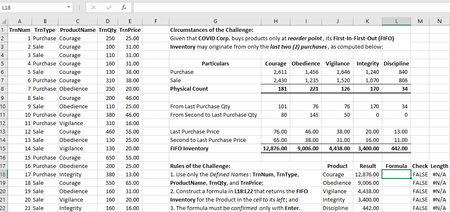

Interesting! I noticed an error in the solution I posted earlier. It didn't adversely affect the result (although it might have under some other conditions), but it was wasted characters in that they added no value.
Here's the corrected (and more streamlined) version.
=LET(
PQt,FILTER(TrnQty,(ProductName=J18)*(TrnType="Purchase")),
SQt,FILTER(TrnQty,(ProductName=J18)*(TrnType="Sale")),
NQt,SUM(PQt)-SUM(SQt),
LPuR,COUNT(PQt),
ARQtPr,FILTER(TrnQty:TrnPrice,(ProductName=J18)*(TrnType="Purchase")),
LPuQ,MIN(NQt,INDEX(ARQtPr,LPuR,1)),
LPuP,INDEX(ARQtPr,LPuR,2),
SLPuQ,MIN(NQt-LPuQ,INDEX(ARQtPr,LPuR-1,1)),
SLPuP,INDEX(ARQtPr,LPuR-1,2),
(LPuQ*LPuP)+(SLPuQ*SLPuP))

Congratulations! You have significantly improved your solution. Were you still unable to use SUMPRODUCT as you announced earlier? I did but I temporarily conceal its usage until I ultimately divulge my solution.
- mathetesFeb 09, 2021Gold Contributor
Yes, still unable to get SUMPRODUCT to work with the two variables named in the LET function. So I had to do it less elegantly.
It was definitely a learning experience, both in my own solution, but also, now, looking through how others have solved it. A great example of how Excel enables multiple routes to the same solution.
In the real world, however, I doubt I'd be an advocate of doing it all in one formula; definitely wouldn't recommend it without LET. The LET function does enable readability, both by shortening, and by ultimately using names that make sense in subsequent formulas. I like for formulas to be intelligible, not only be the developer, but also by the less experienced... So helper columns come in handy for that. It'd be interesting to hear what others think.