Forum Discussion

Sumit_Bhokare
Jul 08, 2021Brass Contributor
Excel data split from multiple column to row
Hi All, Can you suggest how I can move data from multiple columns to rows below one another. below is example how i need
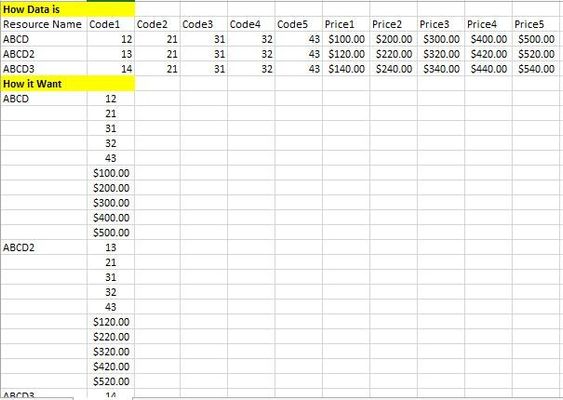
- Jul 08, 2021
Here are the formulas in a version you can paste and fill down:
=IF(MOD(ROW()-ROW($D$7),COLUMNS($B$1:$K$4)),"",INDEX($A$1:$A$4,INT((ROW()-ROW($D$7))/COLUMNS($B$1:$K$4))+1,1))=INDEX($A$1:$K$4,INT((ROW()-ROW($D$7))/COLUMNS($B$1:$K$4))+1,MOD(ROW()-ROW($D$7),COLUMNS($B$1:$K$4))+2)you can either replace the ranges like $B$1:$K$4 with the correct range in each case or I would recommend replacing it with a named variable (e.g. DATA) then you create in the Name Manager under the Formula menu. BTW the $D$7 in these formulas are the first cell where the data will go so that ROW()-ROW($D$7) gives you a count.


Sumit_Bhokare
Jul 13, 2021Brass Contributor
Thanks for guide it works.

Lorenzo
Jul 13, 2021Silver Contributor
You're welcome. You said "I have lot of data" and finally seem to have opted for a formula solution
Not quite sure what "lot of data" means for you. Anyway, your call
Nice day & Thanks for providing feedback
Not quite sure what "lot of data" means for you. Anyway, your call
Nice day & Thanks for providing feedback
- Sumit_BhokareJul 13, 2021Brass Contributor
Lorenzo as I said not much use too with PQ.
I tried as per your guide & it's really working well now, thanks again.
I just need additional info about PQ, if possible will you help?
what needs to do if I want output like