Forum Discussion

Arnold Lopez
Nov 30, 2017Copper Contributor
Excel Compare Data
Hello,
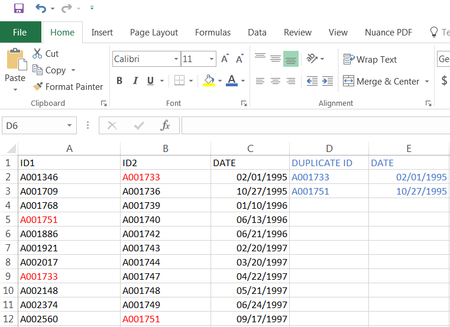
I need help in comparing column B to column A and pulling that duplicate information to column D. My dilemma is I have three columns A, B, C. B and C are connected, column B has the ID...
 Nov 30, 2017
Arnold,
Step 1
Put this formula in cell D2 and fill it down:
=IF(ISNUMBER(MATCH(B2,$A$2:$A$200,0)),B2,"")
Don't forget to change this range $A$2:$A$200 to your existing range.
Step 2
Put this formula in cell E2 and fill it down:
=IF(D2<>"",C2,"")
Step 3
Sort column E from A to Z, or column D from Z to A, to move the duplicate values to the top.
Haytham Amairah
Dec 07, 2017Silver Contributor
They didn't disappear, but moved down and dispersed.
To move them back to the top, sort column A (ID1) from A to Z, or Column E (Duplicate ID) from Z to A.

Arnold Lopez
Dec 08, 2017Copper Contributor
I was able to sort them this time without the other columns disappearing. I also used Notepad ++ to fix the blank spaces then recopied it back to Excel for my reports.
Thank you so much for your help.