Forum Discussion

Excel 2013 Filter problem
- Nov 10, 2020
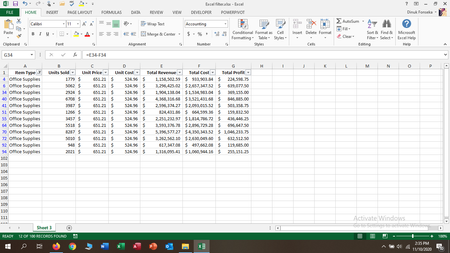
AutoFilter applies each filter separately. So the top 5 filter on the Total Profit column selects the 5 highest profits from ALL rows, not from rows filtered in other columns.
To do what you want, add a helper column:
First, remove the existing filter.
In H1, enter the text Helper (or Dummy, or whatever).
In H2, enter the formula
=SUBTOTAL(9,G2)
and fill down.
Now turn on the filter again.
Filter column A for Office Supplies, then filter the new column H for Top 5.
Based on: Top Ten Values in Filtered Rows
See the attached version.

AutoFilter applies each filter separately. So the top 5 filter on the Total Profit column selects the 5 highest profits from ALL rows, not from rows filtered in other columns.
To do what you want, add a helper column:
First, remove the existing filter.
In H1, enter the text Helper (or Dummy, or whatever).
In H2, enter the formula
=SUBTOTAL(9,G2)
and fill down.
Now turn on the filter again.
Filter column A for Office Supplies, then filter the new column H for Top 5.
Based on: Top Ten Values in Filtered Rows
See the attached version.
