Forum Discussion

Phishdawg
Mar 25, 2023Brass Contributor
Elimate Blank from Calculation
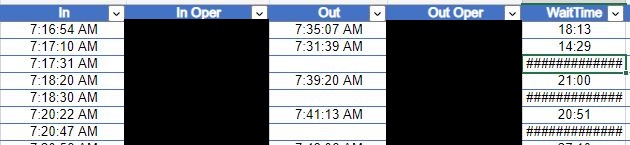
I've got an Excel sheet of over 19,000 items. I am going to (hopefully) use Power Automate to migrate this data from the Excel sheet to a SP List. One issue I have is the formula in the 'WaitTime'...

OliverScheurich
Mar 25, 2023Gold Contributor

Phishdawg
Mar 25, 2023Brass Contributor
Yep, thanks!
Now, the results appear as 12:18:34
The 'Out' (F columns) and 'In' (D columns) are used in the calculation for 'Wait Time'.
All three columns are set as 'Time' format.
The desire is that the 'Wait Time' content appear as '00:18:34', meaning the wait time for that item was a fraction more than18 seconds. How do I lose the '12'?
Now, the results appear as 12:18:34
The 'Out' (F columns) and 'In' (D columns) are used in the calculation for 'Wait Time'.
All three columns are set as 'Time' format.
The desire is that the 'Wait Time' content appear as '00:18:34', meaning the wait time for that item was a fraction more than18 seconds. How do I lose the '12'?