Forum Discussion

editor power query
- Sep 09, 2022
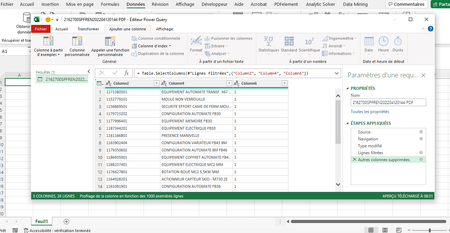
safwen Take the screenshot in your message (see picture) as a starting point.
Klick on the button of the Kind column. Select only "Table" and press OK.
Then in the Data column, press the button with the arrows.
Should look something like this:
Press "Load more" if it show. Now uncheck the box "Use original......" and OK.
That should give you one large table of all the tables combined.


safwen Separate tables or one large table?
- safwenSep 09, 2022Brass Contributor
sir thanks a lot it's workingRiny_van_Eekelen
- Riny_van_EekelenSep 09, 2022Platinum Contributor
safwen Take the screenshot in your message (see picture) as a starting point.
Klick on the button of the Kind column. Select only "Table" and press OK.
Then in the Data column, press the button with the arrows.
Should look something like this:
Press "Load more" if it show. Now uncheck the box "Use original......" and OK.
That should give you one large table of all the tables combined.
- safwenSep 09, 2022Brass Contributor
the steps Riny_van_Eekelen
- Riny_van_EekelenSep 09, 2022Platinum Contributor
safwen A screen shot of what?
- safwenSep 09, 2022Brass Contributorplease can you make screenshot and i will try if you don't mind
- Riny_van_EekelenSep 09, 2022Platinum Contributor
safwen No, expand the entire column of tables and then do your transformation on that one, assuming that all tables have the same structure and require the same transformations. But perhaps, I still misunderstand your intentions.
- safwenSep 09, 2022Brass Contributortable per table ? this will take a lot of time like that
- Riny_van_EekelenSep 09, 2022Platinum Contributor
safwen Then I believe you can filter all the tables first and then just expand the Data column. Dot the transformation needed and Close & Load to a table.
- safwenSep 09, 2022Brass Contributorone large table