Forum Discussion

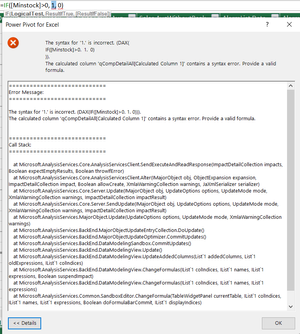
DAX IF error: the syntax is incorrect
 Aug 15, 2021
I seemed to have solved it by changing the list separator in Windows Regional settings to semicolon, and then using the semicolon in the DAX formula.
=IF([MinStock] > 0; 1; 0)For future reference, I found the settings here:
Windows key, then type "region":
In the "Regional Format" window, click on "Additional date, time & regional settings"
Then "Change date, time or number formats"
There: "Additional settings"
There, change "List separator" to semicolon:
I then restarted Excel, not sure if that was necessary.
(To be complete, I also first changed the decimal and grouping separators to respectively point (.) and comma (,) but finally reverted them and it still works.)

bartvana Google for "regional settings power pivot" or "regional settings DAX" and you'll see that regional settings can have an impact. Not for me, though, as I use English Excel with UK settings.
- bartvanaAug 15, 2021Iron Contributor
I seemed to have solved it by changing the list separator in Windows Regional settings to semicolon, and then using the semicolon in the DAX formula.
=IF([MinStock] > 0; 1; 0)For future reference, I found the settings here:
Windows key, then type "region":
In the "Regional Format" window, click on "Additional date, time & regional settings"
Then "Change date, time or number formats"
There: "Additional settings"
There, change "List separator" to semicolon:
I then restarted Excel, not sure if that was necessary.
(To be complete, I also first changed the decimal and grouping separators to respectively point (.) and comma (,) but finally reverted them and it still works.)