Forum Discussion

Cube functions
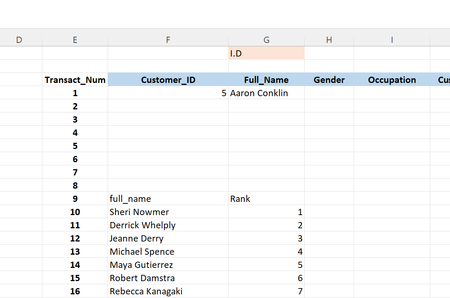

I saw the difference in what I missed. But even when I tried switching up the numbers in the file you sent the numbers didn't always show up correctly. But after researching some more videos, I noticed a trend. They all had a [measure] as a the "sort by". So I made a simple MIN( function of the ID numbers column and it now works once I choose ascending order as well. To anyone that may need to use this as reference, the numbers would have to in perfect order without skipping any numbers in between because if you don't the next number will screw everything up. For e.g. if you you were to have numbers from 1 to 10 and you miss out the 2 and the 4, number 3 will come in as the 2nd smallest number and number 5 will be the 3rd smallest number.
Also you will see the cubeset count one of the photos highlighted in blue w/ white text which is of course the correct amount. However, on another note, the number highlighted in brown tan w/ white text is where I get an N/a reading as if that's the limit of the set. Not sure if it's a bug in excel or if its from the fact the sample data model I used has several flaws unnoticed to me at this time
. Now I'm trying to see how I can get some kind of MATCH( function or something that can be nested the cube function. I'll try cubememberproperty since there's only 7 of them. If you or anyone reading this knows a function that's compatible please make mention. Will try any and post results. Thank you
- ashmackey85Feb 07, 2022Copper Contributor
SergeiBaklan Here's the file itself attached below for your exploration. or anyone else. As I initially mentioned, I had issues getting information to show up correctly from the cube itself onto a spreadsheet. At first I was having issues with the cubeset function simply because it needed a "measure" which I had to figure out. Then still ran into issues with the cubeset of names. The cubeset count was 100 off. I couldn't understand why until it hit me to perform a distinct count of the names column. That is when I found my out what the issue was. I had duplicate names and excel only recognized the first occurrences of each name. I removed the duplicates. I was finally able to get the results I was hoping for. I wanted to be able to enter into a cell, the I.D number and be able to have the name associated with the id number show up. I was also able to get rid of "All" showing up when I entered id# 1. I'm not so advanced some I'm unable to add the formulas in a scroll bar like you did in your demonstrations which I found to be very neat.
- SergeiBaklanFeb 07, 2022Diamond Contributor
That will be better if you could attach sample file. Build data model based on description of some particular situation, make a guess which formulas are used and what is expected - is quite time consuming and not reliable.
