Forum Discussion

Creating sports wrist play call sheet arm band
- Jul 08, 2021
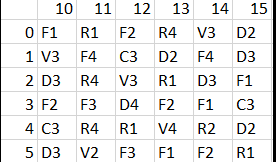
BigWheels8 maybe amit_bhola solution is good enough, that would be great. But for the fun of it I worked out a sheet that might be useful. you can easily print it to both show the grid and the definitions of the numbers/letters and easily change and it guarantees that every possible combination is used at least once (assuming the grid is large enough). File attached.

Ex: I want to make a playsheet that gives me all the pitches, and the code that corresponds...returning the number in the header first, then the number on the side. I will make a column for each 'pitch' so I can easily make calls.
F1
*(each set of calls is highlighted in the cell's color)
10, 0 (highlighted in the cell color)
11, 5
13, 0
14, 1
14, 4
Appreciate your help!

ingizmo In amit_bhola sheet I believe all the cells are randomly assigned so a reverse look up table as you request although possible (nearly everything is) but would take me a bit of thinking (I'll try to avoid, lol).
In the solution I posted above (and corrected in the attached) the randomized order is just repeated so cell I2 (row "0" and column "10") is repeated in cell K5 (row "3" and column "12") and then the sequence repeats until it fill the whole table. With added work it could add more randomization but this technique has a few advantages:
a) it guarantees all options used at least once,
b) it prevents the same call from having the same row/col (assuming the count of calls > columns and not an even multiple)
In the attached I:
- created a new column so after you have a everything set up you can copy and paste the VALUES ONLY to this new column and 'LOCK' the grid so it won't change all the time
- created a lookup column under the grid that creates that reverse lookup you requested. The column right now just uses col F but any order can be inserted there. The formula uses TEXTJOIN to show the multiple options with a separator and uses " ; " right now but that can be easily editted or the formula could be modified to separate the results into separate cells.
- corrected an ERROR in the original post above where I didn't offset the MOD result and hence repeated the first call and missed the last call in the grid
- mtarlerMay 20, 2022Silver ContributorBTW you can ignore the 1st paragraph above as the solution I ended up including in the attached sheet should work equally well on amit_bhola's solution also.