Forum Discussion

Create Invoice Number based on 2 columns and a counter
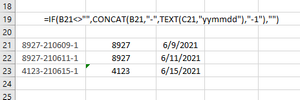
 Aug 05, 2021
The time column makes it work exactly as I am looking for....assuming the user remembers to enter the current time into the sheet. Hmmmm....just couldn't rely on that. So...
I found a method that will enter the current time into the sheet automatically using the NOW() function and circular reference. https://trumpexcel.com/date-timestamp-excel/#Circular-References-Trick-to-Automatically-Insert-Date-and-Timestamp-in-Excel
Formula in TIME column:
=IF(A2<>"",IF(B2<>"",B2,NOW()),"")
Now, using this formula to set the time in a hidden/locked cell, I can use your formula (adjusted) to get the exact outcome I am looking for.
Final formula using the new (auto populating) TIME column:
=IF([@[Truck '#]]<>"", [@[Truck '#]]&"-"&TEXT([@[SERVICE
DATE]],"YYMMDD")&"-"&MATCH([@TIME],SORT(FILTER([TIME],([Truck '#]&[SERVICE
DATE])=([@[Truck '#]]&[@[SERVICE
DATE]])))),"")As an added bonus, these formulas also work on the web version, so the user can enter the data from either the web browser or from within the Excel app.
Thx mtarler for all your help
When I add an additional trip (load id) with the same truck/date combination, the "counter" from the first load that was entered is incremented and the new load is appended with a '1.' This is close, but I need the new load to be appended with the '2' or '3' (what ever the current count is) and the load that is already in the list to maintain their "counter."

The only suggestion I have for you is to add a entry time. Then you can do that same filter/sort/match but use entry time and then it is guaranteed to be in order of when you enter it.
- DarrMikAug 05, 2021Copper Contributor
The time column makes it work exactly as I am looking for....assuming the user remembers to enter the current time into the sheet. Hmmmm....just couldn't rely on that. So...
I found a method that will enter the current time into the sheet automatically using the NOW() function and circular reference. https://trumpexcel.com/date-timestamp-excel/#Circular-References-Trick-to-Automatically-Insert-Date-and-Timestamp-in-Excel
Formula in TIME column:
=IF(A2<>"",IF(B2<>"",B2,NOW()),"")
Now, using this formula to set the time in a hidden/locked cell, I can use your formula (adjusted) to get the exact outcome I am looking for.
Final formula using the new (auto populating) TIME column:
=IF([@[Truck '#]]<>"", [@[Truck '#]]&"-"&TEXT([@[SERVICE
DATE]],"YYMMDD")&"-"&MATCH([@TIME],SORT(FILTER([TIME],([Truck '#]&[SERVICE
DATE])=([@[Truck '#]]&[@[SERVICE
DATE]])))),"")As an added bonus, these formulas also work on the web version, so the user can enter the data from either the web browser or from within the Excel app.
Thx mtarler for all your help
- mtarlerAug 05, 2021Silver Contributoractually another solution would be to add a macro that creates the tracking number on entry but that wont work if you use excel online or if the settings are set to block macros. I would recommend adding a column called entry time and if you click CTRL-SHIFT-; (CTRL-:) that will automatically insert the time. the replace the [Load #] in the formula with the name of the new Time Stamp column.