Forum Discussion

BOquinn
Mar 08, 2024Copper Contributor
Counting by referencing multiple tables in a single function.
Hello, I'm having troubles figuring out the proper process to count the number of trades that are off on a certain date, using the following tables. There is a table for the Personnel, linke...

SergeiBaklan
Mar 08, 2024Diamond Contributor
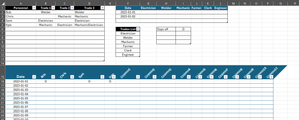
I see, thank you. If change the input a bit it could be like
with formulae as
=LET(
 nDates, 3,
 nTrades, COUNTA(Trades[Trades]),
 dates, SEQUENCE(nDates,,DATE(2023,1,1) ),
 header, TOROW(Trades[Trades],3),
 offDays, LAMBDA(date,trade,
   LET(
     offNames, FILTER(DaysOff[[Person]:[Person]],
        DaysOff[[Date]:[Date]]=date),
     tradeNames, FILTER(PeopleTrades[[Personnel]:[Personnel]],
        PeopleTrades[[Trade]:[Trade]]=trade),
     IFERROR(SUM(--(offNames=TRANSPOSE(tradeNames) ) ), 0)
 ) ),
 fillOff, MAKEARRAY(
    nDates,
    nTrades,
    LAMBDA(n,m,
      offDays(
          INDEX( dates,n,1),
          INDEX( header,1,m) ) )
  ),
 VSTACK(
    HSTACK( "Date", header ),
    HSTACK( dates, fillOff ) )
)
If such input is not desirable when transpose to like form within calculations.

BOquinn
Mar 08, 2024Copper Contributor
Apologies for the confusion Sergie, but we're looking for a solution that doesn't require VBA or coding, as they want to be able to make adjustments once I've completed my term - is the desired output possible with only functions and formulas?
- SergeiBaklanMar 08, 2024Diamond Contributor
Both do not require VBA.
First one is regular formula which uses Excel 365 function. You may copy/paste that formula in formula bar (or check it in the attached file) and it shall work. Since that's multiline formula better to expand formula bar.
Second one uses data model which shall be available practically on any more or less modern version of Excel Desktop. On Windows, not on Mac. Here is also no VBA coding. Tools to work with data model (build relationships, add measures) are within Excel.