Forum Discussion

sandrosg
Dec 17, 2022Copper Contributor
Count and show multiple numbers who appear in an array
Hi there, I'm new to this community and tried searching the net and other support pages for a rather simple task. I got an array of numbers such as seen in the screenshot. I need to show those number...
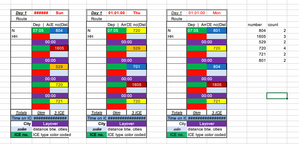
- Dec 17, 2022
With SCAN
=LET(
  range,  AN95:AX107,
  tocol,  TOCOL(CHOOSECOLS(range, SEQUENCE(,(COLUMNS(range)+1)/4,3,4)),1),
  uniq,   SORT(UNIQUE(tocol)),
  freq,   SCAN(0,uniq, LAMBDA(seed,number, COUNT(FILTER(tocol,tocol=number)))),
  VSTACK({"Number","Count"}, HSTACK(uniq,freq))
)

sandrosg
Dec 17, 2022Copper Contributor
Lorenzo When I put in new unknown values the function stops working. Pls see the screenshot. The red numbers are new so for 529 I need to get a 2 and for 856 a 1. Short and sweet:" how to handle new unknown values" ?Thx again Sandro


Lorenzo
Dec 17, 2022Silver Contributor
This works no problem here. No change in the formula:
Make sure there's enough empty cells below AZ94 & BA94 to allow the formula to spill, otherwise you get a #SPILL error, as in your picture (https://support.microsoft.com/en-us/office/how-to-correct-a-spill-error-ffe0f555-b479-4a17-a6e2-ef9cc9ad4023)