Forum Discussion

alex_n
Mar 09, 2023Brass Contributor
Conditional Formatting based on comparing cell references
Hi All, I have a rate spread sheet (below) that has 7 columns: A B C D E F G 1 Cost Descr Cost Amount Rate Applied Rate Factor Current Rate (light green) Live Rate (lig...
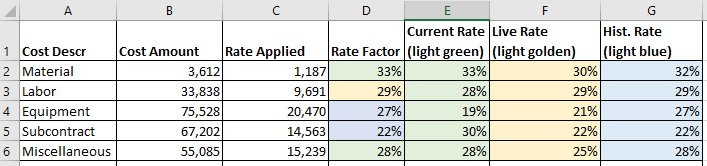
- Mar 09, 2023
OK, try this.


ricardojose
Mar 09, 2023Brass Contributor
alex_n , here you go!
Best

alex_n
Mar 09, 2023Brass Contributor
The pseudo example would be as follows:
if (the content of D2 is "=E2", then format D2 cell fill to light green color)
D2: Rate Factor
E2: Current Rate (light green color column)
I tried to use Indirect() function with combination of Address() function but could not get it to the level it would work. I may be doing something wrong here.
- HansVogelaarMar 09, 2023MVP
See the attached version.
- alex_nMar 09, 2023Brass ContributorHans, thank you. Your solution is value-based as well. The way I see, a cell reference-based solution would help here.
- HansVogelaarMar 09, 2023MVP
OK, try this.
- ricardojoseMar 09, 2023Brass ContributorMaybe you will need to reconceptualize the solution to work as needed. The only thing I can think of to achieve that and I know is possible is through macros. Are you allowed to convert that file into a macro-enabled workbook?