Forum Discussion

Calculated items issue in pivot table
- Mar 28, 2022
you just need to apply a value filter. Right-click on one of the "Clé de répartition" items and select "Filter | Value Filters..."
There you can filter on values the do not equal 0:

Hello Matthieu_Peters
thank you, now it's clear. You need to create a caluclated item instead.
Select one of the two column headers (Reel or BI), then goto PivotTable Analyze and select "Calculated Item..."
Then select the field Statut and enter the formular like this:
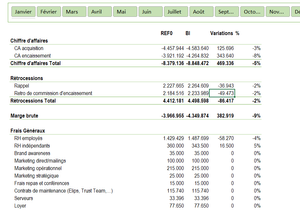
This should give the desired result, like in my example:

- Martin_WeissMar 28, 2022Bronze Contributor
you try to insert the calculated item in the wrong field "Categorie", but it should be in the field "Statut". So, you need to first select the cells "Reel" or "BI" in your pivot table and then create the new calculated item:
- Matthieu_PetersMar 28, 2022Copper Contributor
Martin_Weissthanks a lot for the help.
However I do not have the same layout as previously and all "Clé de répartition" are shown.
- Martin_WeissMar 28, 2022Bronze Contributor
you just need to apply a value filter. Right-click on one of the "Clé de répartition" items and select "Filter | Value Filters..."
There you can filter on values the do not equal 0: