Forum Discussion

littlevillage
Dec 21, 2022Iron Contributor
CALCULATE function not allowed use in a TRUE/FALSE expression.
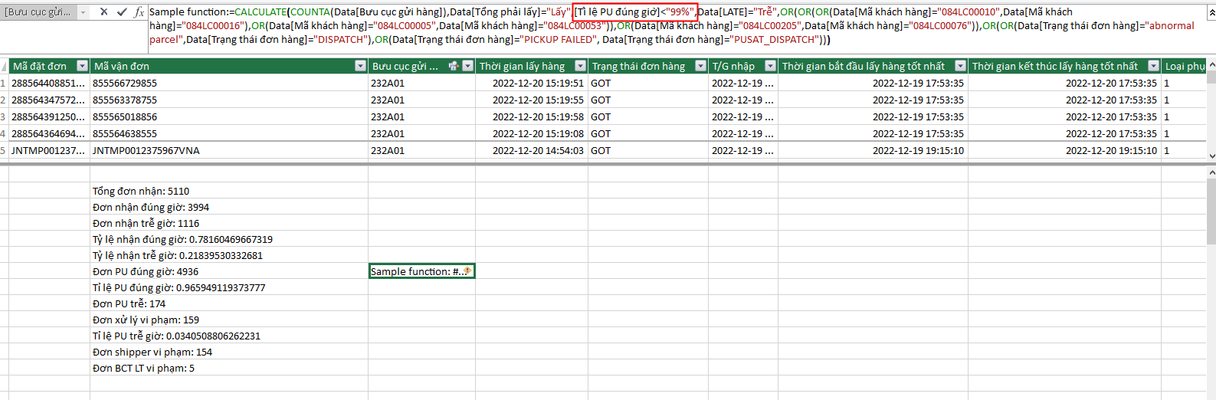
Hi, I would like to filter data with criteria : [Tỉ lệ PU đúng giờ]<"99%" I try to write a sample function as below in Power Pivot. Sample function:=CALCULATE(COUNTA(Data[Bưu cục gửi hàng]...
- Jan 10, 2023
I combined initial measures into one, but you may return back
Intermediate count:=VAR filter1 =
    CALCULATETABLE (
        Data,
        Data[Tổng phải lấy] = "Lấy",
        OR (
            OR (
                OR ( Data[Mã khách hàng] = "084LC00010", Data[Mã khách hàng] = "084LC00016" ),
                OR ( Data[Mã khách hàng] = "084LC00005", Data[Mã khách hàng] = "084LC00053" )
            ),
            OR ( Data[Mã khách hàng] = "084LC00205", Data[Mã khách hàng] = "084LC00076" )
        )
    )
VAR filter2 =
    CALCULATETABLE ( Data, FILTER ( filter1, Data[PU đúng giờ] = "PU đúng giờ" ) )
VAR filter3 =
    CALCULATETABLE ( Data, FILTER ( filter1, Data[LATE] = "Trễ" ) )
VAR filter4 =
    CALCULATETABLE (
        Data,
        FILTER (
            filter3,
            OR (
                OR (
                    Data[Trạng thái đơn hàng] = "abnormal parcel",
                    Data[Trạng thái đơn hàng] = "DISPATCH"
                ),
                OR (
                    Data[Trạng thái đơn hàng] = "PICKUP FAILED",
                    Data[Trạng thái đơn hàng] = "PUSAT_DISPATCH"
                )
            )
        )
    )
VAR counting =
    IF (
        COUNTROWS ( filter2 ) / COUNTROWS ( filter1 ) < 0.99,
        COUNTROWS ( filter4 ),
        BLANK ()
    )
RETURN
    counting
Based on it final measure
Final count:=IF (
    HASONEVALUE ( Data[Bưu cục gửi hàng] ),
    [Intermediate count],
    SUMX ( Machinhanh, [Intermediate count] )
)
Result is

littlevillage
Jan 25, 2023Iron Contributor
in the image below, I have added 2 fields (Mã vận đơn and Trạng thái đơn hàng), it still show 82 but actually, sum of Final count column is 85. May be 239D01 and 237H01 should be removed becasue "Tỉ lệ PU đúng giờ" > 99% then result is 82.
Hope for your response.

SergeiBaklan
Jan 25, 2023Diamond Contributor
It depends on what you'd like to receive. Value in Grand Total has no connection with values in the column. Grand Total is calculated by separate formula, thus not necessary equal to the sum of column values.