Recent Discussions

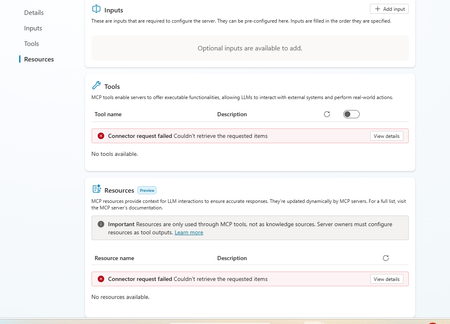
Dataverse mcp is broken in copilot studio
This is really annoying. I am having this experience where dataverse mcp is broken. I recreated the connection and after that the query is returning empty results. Everything was working fine until last week. Is anyone experiencing same problem90Views1like1CommentIntermittent Post-Deployment Issues with Copilot Agent Using SharePoint Knowledge Sources
Summary We are testing a Copilot Studio agent following admin approval and installation for a set of users before we launch it to everyone in the organization - the objective being to test out the end user experience and check that everything is working fine. We have encountered several inconsistent behaviours using the agent across both the Copilot app and Microsoft Teams. The issues seem to be resolved after signing out, restarting the application, or signing in again. 📍Looks like a lot of instabilities and poor end user experience with this method & this is blocking us from launching the agent to the organization. Agent Setup Agent built in Copilot Studio & deployed via pipeline (Development > QA > Production) Knowledge source 1: SharePoint connection using Dataverse indexing/synchronisation Knowledge source 2: Live SharePoint connection Tested in the following apps after admin approval/publishing/pinning: Microsoft Copilot app Microsoft Teams Issues observed Agent not visible in Copilot app After agent is approved, installed, shared and pinned (to specific users) from Admin side, the agent is not visible in Copilot app. We gave it over 8 hours after the admin process. Agent appeared after signing out of Copilot app and signing back in again. SharePoint connection consent prompt not displayed Users are expected to receive a prompt with consent to connect to SharePoint (with "Allow" button). What appears is only a message but no card with the "Allow" button. This started working after signing out of Copilot app and signing back in again - so the sign out + sign in had to be done twice Responses not retrieved from Knowledge source 1 In spite of proceeding with the "Allow" prompts, for some users, the responses are coming only from Knowledge source 2 (live connection) & not Knowledge source 1 (connection with dataverse indexing). This is seen both when interacting with the agent in Copilot app and Teams. For some users, this was fixed after signing out and back into the apps Questions Has anyone experienced such instabilities with admin deployment/publishing of agents? If yes, what have you done to sort them out and have you been able to successfully launch agents organization wide with this approach? Does anyone know about known issues/glitches with admin deployment/publishing of agents? We did not see these issues when sharing the agent using Copilot Studio.65Views1like2Comments
Disabling Agent Creation for End Users with Copilot for Microsoft 365
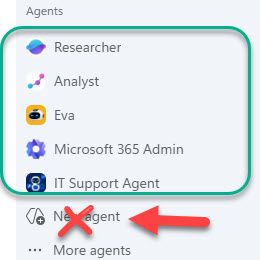
Hello! I am an IT admin at my organization, and we recently rolled out Copilot for Microsoft 365 for all end users. I would like our end users to be able to access agents published by my organization and Microsoft (Analyst, Researcher, etc.) but I do not want them to be able to create agents in Copilot Studio OR Agent Builder. We have disabled Copilot Studio at the license level, but our end users are still able to create agents in the M365 Copilot app with the "New Agent" button. To summarize, I want our users to be able to access Agents created by our organization and Microsoft, but I do not want them to be able to create any agents of their own at this time. Is there a way to do this? Thank you in advance, stevenwagner
Copilot Chat Retention vs Memory: What Happens to Chat History Inferences?
How do Chat History inferences behave after tenant retention deletes the underlying Copilot interactions? Microsoft's documentation explains that: Saved Memories persist until explicitly deleted. Chat History personalization creates inferred details. Purview retention policies do not apply to Copilot Memory. What is unclear is the lifecycle of Chat History inferences when the Copilot interactions that originally contributed to those inferences are permanently removed by a tenant retention policy. Example: A tenant has a 60-day retention policy for Microsoft 365 Copilot interactions. Copilot infers user preferences from conversations. The source conversations are later removed due to retention. Does Copilot: Retain those inferred details? Recompute them from remaining conversations? Remove them because the source interactions no longer exist? Understanding this is important because users may experience changes in Copilot personalization without understanding why.41Views0likes1CommentCopilot API for usage
From the microsoft admin backend it is possible to download usage from copilot, so it is possible to see how many prompts users have made etc. But i struggle to find an API that support that lookup. If have found API that show last activity date - but need an API that shows how many prompts etc has been used. I don´t want to see what is prompted of course - but just to show amount of prompts, so we can verify how much usage there is and make some automation in case copilot is not used, as license then can be removed116Views0likes2CommentsHow to Fix Microsoft Copilot Not Working on Windows: Easy Solutions That Actually Help
Microsoft Copilot can be a genuinely useful Windows companion. Whether you use it to brainstorm ideas, summarize information, create images, find answers, or get help with Windows settings, it can save a surprising amount of time. But when Copilot suddenly refuses to open, gets stuck loading, crashes, shows a blank screen, or simply stops responding, the experience can be frustrating. Link to the postCreated agents are shown twice in "Shared with you"
Hi all I've noticed for myself, and for several of our users, that when agents are created in Copilot Studio, and shared. Each agent is shown twice, when people access their "Shared with you" in Copilot. Why is that, and does anybody else experience this?54Views0likes1Comment
Copilot Notebook features missing
I think it was back in March or April that improved features for Notebooks in Copilot were added as General Availability: the Audio overview, Mind Map and others. I have Copilot Premium, can and have created a notebook, but those features are greyed out for me. I'm pretty sure I have enough content (3 files with approximately 500 pages of content) in the Notebook but when I click those buttons, I see a message: More in OneNote Power BI Notebook isn't available here yet, but coming soon. For now, you can open it in OneNote. Those features are in OneNote, but not in Copilot. What's wrong, and what can I do to get them working in Copilot Notebooks? Thank you for your answer87Views0likes1Comment
Copilot in OneNote cannot access content in sidebar (Microsoft 365 Premium)
a { text-decoration: none; color: #464feb; } tr th, tr td { border: 1px solid #e6e6e6; } tr th { background-color: #f5f5f5; } Hello everyone, I'm hoping someone from the OneNote or Copilot team can help with an issue that has prevented me from using Copilot in OneNote for approximately two months despite having an active Microsoft 365 Premium subscription. Issue Copilot can detect that a OneNote page is open, but it cannot access or read the contents of the page. For example, if I open a page named 1Cor4:1-16.onepart or create a brand-new test page, Copilot acknowledges that the page exists but responds with something similar to: "I can see that the file is open, but I cannot access the note contents." As a result, Copilot cannot summarize, analyze, answer questions about, or otherwise interact with the contents of the current page. Environment Microsoft 365 Premium (Personal Subscription) OneNote for Microsoft 365 Version 2608 Build 16.0.20326.20100 (64-bit) Windows Desktop Notebooks stored in and synced through OneDrive Troubleshooting Completed I have already performed extensive troubleshooting, including: Verifying my Microsoft 365 Premium subscription is active Verifying I am signed into the correct Microsoft account Signing out and back into Office and OneNote Confirming notebooks are syncing properly Updating Office and OneNote to the latest version Restarting OneNote and Windows multiple times Creating brand-new notebooks and test pages Testing across multiple days and sessions The issue is fully reproducible on both existing notebooks and newly created notebooks. Microsoft Support Findings I have already worked directly with Microsoft Support. A support technician remotely connected to my computer and reviewed my configuration. They confirmed that Copilot in OneNote should be functioning in my environment. During the support session they performed multiple troubleshooting and repair actions, including uninstalling and reinstalling components, repairing Office, and verifying account and licensing status. Despite all of this, the problem remained unchanged. The technician indicated that the issue appears to be on the Copilot/OneNote side rather than being caused by my local setup. Since they were unable to resolve it, they recommended that I post here in the Microsoft Tech Community to seek further escalation and visibility. Questions Has anyone else experienced an issue where Copilot can see the currently open OneNote page but cannot access the page contents? Is there a known service-side, provisioning, or feature-rollout issue that could cause this behavior? Is there a way to escalate this directly to the OneNote or Copilot engineering teams? At this point, I've been paying for the feature for roughly two months and have not been able to use the core OneNote Copilot functionality at all. Any assistance or guidance would be greatly appreciated. Thank you.Copilot Call Delegation Does Not Work with Compliance Recording Applications
Hello, I was able to isolate an issue related to Copilot Call Delegation and compliance recording applications. We have successfully configured Copilot Call Delegation and confirmed that it functions as expected in a standard Teams Phone environment. However, when a compliance recording application is assigned to the user, Copilot Call Delegation no longer works correctly. The Copilot delegate does not join or participate in the call as expected. Has anyone else encountered this behavior? Is there a known limitation, compatibility issue, or recommended configuration when using Copilot Call Delegation alongside Teams compliance recording solutions? Any guidance from the Microsoft product team would be greatly appreciated. Thank you.47Views0likes1Comment
Accepted the new Copilot update from Mac, iPhone, and iPhone and lost my entire Library
Greetings, all. I just accepted the install for a new Copilot update for my three Apple devices, and lost all pages in my Copilot Library. Microsoft promotes the sustainability of the Library storage as their AI continues to evolve and improve. But, really not happy that I've lost all of the documents where my edits to the pages were not covered in a chat conversation. Has anyone else experienced this problem and hopefully found solutions to retrieve the lost pages? I've tried to use Copilot to solve this problem without any success. Thanks, all.20Views0likes0CommentsCopilot Voice featured no longer available for M365 Personal Subscription
Hello, after an hour with MS Support trying to troubleshoot, they told me to ask here, as they were unable to help. Copilot Voice used to be available on my M365 Personal subscription (it's actually a Family subscription, but I am the primary account owner and only real user). However a few months back (maybe more), the voice chat feature disappeared from my account. Specifically, I enjoyed using this on my iPhone with the M365 Copilot app so I could use Copilot in Carplay while driving. But I confirmed it's gone everywhere on my account; MacOS M365 Copilot app, Windows 11 M365 Copilot app, and even missing on https://m365.cloud.microsoft/chat. I have a Work account and verified that I can logout of personal, and login to Work and all the same apps will work fine with Copilot Voice. Everything I read, this feature should still be present and available on my personal subscription (EX: https://support.microsoft.com/en-US/Microsoft-365-Copilot/ai-credits-and-limits-for-microsoft-365-subscriptions), but I could not get MS support to check my account to see what the issue was. Their focus was on having me uninstall all software and reinstall until they finally got fed up with me, told me to ask here, and hung up on me. Yes the basic Copilot app will allow voice, but I would prefer to use the M365 Copilot apps and website for the full feature set (notebooks, etc) and get the Carplay back working (not available in the basic app). If anyone knows what the issue could be, and how I could get Copilot Voice chat back for my account, would you please help? Thank you!192Views0likes3CommentsSharePoint List Agent with Microsoft 365 Copilot – Create Lists Instantly with Natural Language
🚀 New Video! Introducing the SharePoint List Agent powered by Microsoft 365 Copilot Microsoft continues to push boundaries with AI in the workplace, and the new SharePoint List Agent is one of the most exciting capabilities rolling out right now. Based on Message Center MC1208689 and Roadmap ID 534606, this feature brings a huge productivity boost: you can now create SharePoint lists simply by describing what you need in natural language — directly within Copilot experiences across Teams, Outlook, Word, and more. In my latest YouTube video, I walk through: ✨ What the SharePoint List Agent is and how it works ✨ How Copilot turns structured content (orders, invoices, expenses, projects…) into lists in one click ✨ The updated GA rollout timeline for February 2026 ✨ Admin controls and licensing requirements ✨ Real scenarios where this feature saves time and reduces manual work This is a significant step forward for organizations using Microsoft 365 Copilot — making list creation simpler, faster, and more intuitive than ever. 🎥 Watch the full breakdown here: 👉 https://youtu.be/uypMK-jLw_0 If you work with SharePoint, Copilot, or Microsoft 365 in general, this is definitely a feature you’ll want to explore. Let me know what you think in the comments! 👇 #Microsoft365 #Copilot #SharePoint #M365Updates #AIProductivity #GiulianoDeLuca #SharePointListAgent #MicrosoftAdminsCopilot Studio agents problems connecting to Sharepoint knowledge source
Hello, Since last week users in my tenant are experimenting issues regarding the connection between copilot studio agents and Sharepoint. The agents are not able to extract information from Sharepoint sites, printing there is not information in the Sharepoint site regarding the user's question when that information is in Sharepoint. These agents used to work well till last week. Does have been any update in Microsoft 365 services that can be affecting these agents ability to retrieve information from Sharepoint?1.1KViews1like16CommentsRecent Bug or issue i got for last 3 days when i am using Chat sessions.
Recent Bug or issue i got for last 3 days when i am using Chat sessions after creating New Projects and saving outside chats there. But in New chats when i opened and used attachment to it from Notta Memo it is clearly working its taking transcript and giving Summary and details i asked. Please help if any one faced same issue and you guys got any resolution in fixing this issue. Thanks in advance.20Views0likes0CommentsA Guide to Prompt Coach
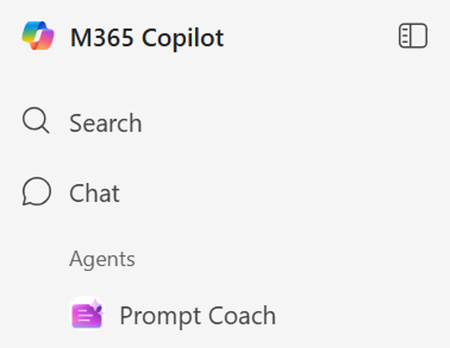
Prompt Coach is a ready-to-use Agent built by Microsoft, included with free Copilot (Copilot Chat) and Microsoft 365 Copilot subscriptions. Teaches how to write clear, structured prompts Reviews existing prompts and suggests improvements Creates high-quality prompts tailored to your context Checks prompts for compliance and fairness Note: Prompt Coach is not available with Microsoft personal subscriptions Why use Prompt Coach ⭐ You’re new to Copilot (or any Gen AI tool) and learning how to prompt ⭐ Your prompts aren’t giving the results you want ⭐ You want to create effective prompts on the first try rather than a “trial-and-error” approach ⭐ You want to build skills to write your own high-quality prompts How to access Prompt Coach Go to M365 home and you will find Prompt Coach under the list of Agents. Let's go through a scenario 👤 You are a Recruiter 📝 You’ve written a job description for a new role and want a quality review before publishing ❓ You are not sure what prompt to use 💡 You know the prompt should start with “Analyze the job description” Step 1 - Open Prompt Coach and ask Analyze my prompt and provide feedback on how I could improve it "Analyze the job description" Step 2 - Receive actionable feedback from Prompt Coach Step 3 - Get an improved prompt from Prompt Coach 💡Tweak and refine what Prompt Coach gives you to make the prompt match your voice, context and goals.7.9KViews2likes2Comments
Problem that copilot is unable to see all my emails in outlook
Copilot returns incomplete http://outlook.com/ email search results while Outlook Desktop and Outlook Web return complete results Product Microsoft Copilot (Windows App) Microsoft Copilot (Web) http://outlook.com/ Outlook Desktop Outlook on the Web Issue Summary Copilot is returning incomplete email search results from my http://outlook.com/ mailbox. The same mailbox searched directly in Outlook Desktop and Outlook on the Web returns complete and accurate results, but Copilot only returns a subset of the matching emails. The issue occurs in both the Copilot Windows application and Copilot on the web, suggesting the problem is not device-specific. Environment Microsoft Account Personal Microsoft account http://outlook.com/ mailbox Microsoft 365 Personal trial currently active Devices Windows laptop Completely rebuilt from scratch to troubleshoot this issue Internal storage wiped Fresh Windows installation performed All current Windows updates installed All current Microsoft 365 / Office updates installed Applications Tested Outlook Desktop (latest version) Outlook on the Web Microsoft Copilot for Windows Microsoft Copilot on the Web Account Status Same Microsoft account used for Outlook and Copilot Mailbox accessible and functioning normally Mail synchronization appears healthy Outlook search functioning correctly Problem Description On Monday 3 August 2026, my Inbox contained 12 messages. Examples included: Tesco http://amazon.co.uk/ eBay Yahoo Microsoft Account Team Microsoft 365 When I asked Copilot to list emails received on 3 August 2026, Copilot returned only a subset of those emails. Copilot was able to locate: Tesco order confirmation Tesco order amendment Microsoft 365 trial activation Microsoft account password change However, Copilot did not return several emails that were visibly present in the Inbox, including Amazon, eBay, Yahoo and other Microsoft account notifications. Expected Result Copilot should return all emails matching the requested date range, consistent with Outlook Desktop Search and Outlook Web Search. Actual Result Copilot returns only a partial subset of the matching emails despite the emails being clearly present in the mailbox. Diagnostic Testing Performed Outlook Desktop Search Result: ✅ Returns all expected emails. Outlook Web Search Result: ✅ Returns all expected emails. Copilot for Windows Result: ❌ Returns only a subset of emails. Copilot Web Result: ❌ Returns the same subset of emails. Operating System Result: ✅ Fresh Windows installation completed. Office Installation Result: ✅ Fully updated. Mailbox Access Result: ✅ Mailbox functioning normally. Why I Believe This Is a Copilot Search Service Issue The issue reproduces: Across multiple Copilot clients On a freshly rebuilt device While Outlook Desktop Search works correctly While Outlook Web Search works correctly Since both Outlook clients return complete results and both Copilot clients return incomplete results, the evidence suggests a discrepancy in the mailbox search/indexing layer used by Copilot rather than a problem with Windows, Office, Outlook indexing, or the local device. Request Please investigate: Whether Copilot is using a different mailbox index from Outlook Search. Whether my mailbox has been only partially ingested into the Copilot search service. Whether there are known issues affecting http://outlook.com/ personal accounts and Copilot email retrieval. Whether Microsoft can trigger a reindex, resynchronization, or repair of the mailbox content used by Copilot. Whether there are any diagnostic tools available to compare Outlook Search results versus Copilot Search results. Evidence Available I can provide: Screenshots showing 12 emails present in Outlook Inbox on 3 August 2026. Screenshots of Outlook Desktop search results. Screenshots of Outlook Web search results. Screenshots showing Copilot returning only a subset of those emails.233Views0likes3Comments
What is the best file format for an AI agent knowledge base?
This is a best practice sharing the best format for an agent and show you why you should convert your PPT, PDF, WORD into a TXT markdown. I had an issue with my agent, time taken to answer was too long, and usually we spend a lot of time asking: What is the best prompt? Why is my agent slow? Why does retrieval sometimes work and sometimes fail? How can I improve answer quality? But I realised I was asking another question much less often: What is actually the best file format for the knowledge base? PDF? Raw text? Markdown? Pre-chunked text? Semantic sections? Context-enriched text? And more importantly: How much does the format alone affect agent performance? I tried to find a quantified benchmark answering this specific question, with the same agent, same source knowledge and same questions, but different knowledge representations. I couldn't find one that really answered what I wanted to measure. So I decided to run the experiment myself on a real case. My first exploratory tests were already surprising: depending on the representation, the agent could be significantly faster and more accurate, despite working from the exact same source information. So I decided to push the test further. My objective I want to identify, without assumptions and based on actual evaluation data, how a long document should be prepared for an LLM knowledge base so that the agent can retrieve, understand, ground and answer from it as reliably as possible. I focused on five dimensions: Answer quality Retrieval reliability Source grounding / citations Execution time Robustness across single-turn and multi-turn questions The broader question I'm trying to answer is: How should we structure knowledge so that an LLM can retrieve and use it as reliably as possible? The test case I deliberately chose a document that isn't particularly friendly for RAG: a 46-page European regulation, https://eur-lex.europa.eu/eli/reg/2011/1169/oj?locale=fr, on the provision of food information to consumers. The information is distributed across articles, definitions, exceptions, annexes, tables, numerical thresholds and cross-references. That makes it useful for testing retrieval: answering correctly often requires finding a very specific piece of information while preserving enough context to understand how it applies. I used the native PDF as the baseline and created 6 additional knowledge-base representations of the same document: Raw TXT Markdown Chunk-ready TXT RAG-oriented units Semantic TXT Contextual TXT One rule: same knowledge, same agent, same instructions, same questions. Only the knowledge representation changes. The benchmark I used two evaluation sets: 42 single-turn questions testing broad coverage of the document: direct facts, thresholds, exceptions, annexes, lists and cross-references. 5 multi-turn conversations containing 13 questions, to see what happens when a user asks a question and then follows up with things like: "And in this case?" "What are the exceptions?" "And for dietary fibre?" This gave me: 47 evaluated test cases / 55 actual questions per format Across all 7 formats: 329 evaluated conversations 385 user questions executed First results Metric Native PDF Best structured representation Overall pass rate 66.0% 85.1% - Contextual TXT Best single-turn score 69.0% 88.1% - Chunk-ready TXT Multi-turn benchmark 40% 80% - Contextual TXT Multi-turn execution time 14m24 5m54 Total benchmark time 44m31 24m49 The quality gap was already substantial: 66.0% → 85.1% That's +19.1 percentage points while keeping the underlying knowledge unchanged. I also saw a major difference in execution time. On the multi-turn test: 14m24 → 5m54 That's approximately 2.4× faster. Across the complete benchmark: 44m31 → 24m49 Around 44% less execution time. These timings represent the complete agent evaluation pipeline, so they shouldn't be interpreted as pure LLM inference latency. But the difference under identical test conditions is large enough that I want to understand it better. Findings There wasn't one format dominating every benchmark. Chunk-ready TXT scored highest on independent questions: 88.1%, while Contextual TXT performed better across multi-turn conversations and finished with the highest overall score. That may suggest that the way we optimise a document for isolated retrieval isn't exactly the same as the way we should prepare it for conversational retrieval. In the contextual version, I tried to make every section understandable when retrieved independently by keeping useful information around it: Source references Section context Retrieval cues Relevant cross-references For regulatory documents, this seems particularly important. A numerical value retrieved alone can be meaningless without knowing which rule it belongs to, under which conditions it applies, and whether another article contains an exception. Where I am now This remains an exploratory benchmark: One document One domain One agent setup One evaluation framework One run per configuration There are plenty of things I still want to test: repeated runs, retrieval-level evaluation, token consumption, larger knowledge bases, other document types, chunk sizes, overlap, contextual headers, and more. But these first results already convinced me that the preparation of the knowledge base deserves much more attention when evaluating an agent. We often spend hours refining instructions while the same information may behave very differently depending on how it reaches the retrieval layer. Next step I'll share the prompts, knowledge-base formats and evaluation methodology on GitHub so the experiment can be reproduced and challenged. I'll keep enriching the repository as I test new formats, improve the evaluation set and add new results. If people here have ideas, edge cases or formats worth testing, I'd genuinely like to include some of them in the next iteration. What would you test next?141Views1like1Comment



Events
Recent Blogs
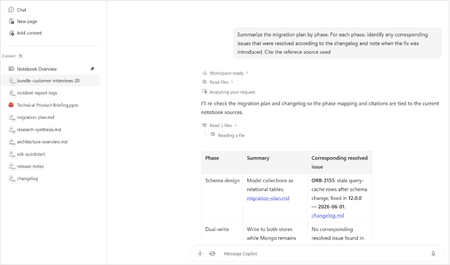
- Bring READMEs, wikis, logs, transcripts, and rich-text files into Copilot NotebooksAug 13, 20266.5KViews4likes4Comments
- Now the LegalZoom agent works inside Microsoft 365 Copilot so a legal task no longer means stepping away from your work.Aug 12, 20261KViews0likes0Comments