Forum Discussion

Alejandro Dopazo
Mar 05, 2018Copper Contributor
Connect to a MySQL database - Error Excel 2016 for Mac
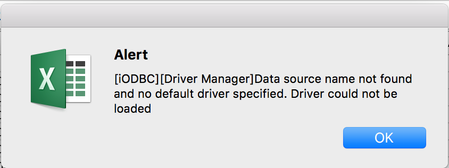
When trying to connect to an external database I get the error message:
[iODBC][Driver Manager]Data source name not found and no default driver specified. Driver could not be loaded
 Oct 19, 2018
Thank you
JKPieterse wrote:
I found this page, perhaps it helps you find the right ODBC driver for your platform? https://dev.mysql.com/downloads/connector/odbc/

JKPieterse
Oct 19, 2018Silver Contributor
The screen-shot talks about SQL Server, my link is about MySQL. Those are different animals!
Alejandro Dopazo
Oct 19, 2018Copper Contributor
Thank you for your reply. I'm confused, do not see any mention to SQL Server in my posts, I am trying to connect to a MySQL Database from Excel for Mac Version 16.18.
- JKPieterseOct 19, 2018Silver ContributorYour uploaded screenshot claerly states SQL Server ODBC : https://techcommunity.microsoft.com/t5/Excel/Connect-to-a-MySQL-database-Error-Excel-2016-for-Mac/m-p/275679?attachment-id=8675
- Alejandro DopazoOct 19, 2018Copper Contributor
Ok, I just learned the difference between MySQL and SQL Server, thank you. I tried using New Database Query/From Database and got the following error:
I guessed this is the route to use MySQL Connector/ODCB to connec to MySQL. Microsoft's website says Excel 2016 for Mac includes ODBC drivers, but I guess only for SQL Server Databases, correct? Do you know which ODBC drivers for MacOS should I install for the MySQL/ODBC to work? Thank you.
- JKPieterseOct 19, 2018Silver ContributorI found this page, perhaps it helps you find the right ODBC driver for your platform? https://dev.mysql.com/downloads/connector/odbc/