Event details
Join the Microsoft Planner product team to hear about recent updates to the new Planner and a sneak peek about what's coming next on our roadmap. Our product maker experts will showcase some of the key new capabilities and improvements of the new experience, including demonstrations on how to leverage Copilot in Planner, new Baselines to stay on track, web app updates, integration with Whiteboard, and more.
The event includes dedicated time for live Q&A where you'll have a chance to ask the Planner product team the questions you have from anything discussed and shared during this event.
Note: You need to be signed in with your Microsoft Tech Community profile/ID to be able to: A) RSVP to this event, and B) Ask a question or leave a comment on this page for the Planner product team.
562 Comments
 sknoop-coscBrass Contributor
If Planner is to replace Project/Project for the Web, and we are now 8 years into development, many of these features mentioned by others should already be available. Creating feature disparity/licensing differences among 3 products designed for project management has made choosing which product to use almost impossible. We all need, and quickly, a modern (keep the attention of the newer generation who's going to be using the product), flexible (can be used for simple and complex projects without having an overly complicated entry point) project management too that is well integrated with the Microsoft suite (Outlook, SharePoint, PowerApps). I'll reiterate a few missing features that have caused our organization pain:
- The inability to @mention someone in Planner tasks. @Mention should go to Teams or Outlook or both (configurable maybe?) to we meet the assignee in the communication tool that they use.
- Along with this, when Comments are added to a task by another assignee or the PM, that should generate some notification to the assignee(s) in their chosen platform. Currently, comments go to a Team DL that is not always present in Outlook dending upon how a user has set it up. And further, if an assignee has not yet commented themselves, they will not be included directly on new comments.
(These two points above make task management very difficult in Planner as people don't get updates/info in a timely manner)- Integration with Roadmap (which could be improved to show impact of delays for instance) for quick executive/team visual reporting.
- Inability to embed a Planner project into SharePoint. We want to use SharePoint as the central place to manage a project, such that any documents, lists, calendars, news, are all accessible from a visually pleasing, well organized, and central location.
(Please integrate SharePoint and Outlook calendars so team calendars can be accessible in Outlook and SharePoint. Teams/SharePoint integration is not sufficient for the above comment...it is better to work in SharePoint)- Integration with OneNote, such that a task can be easily created from a tag in OneNote. This is where many organizations keep project notes and updates, so why not?
- Establishing dependencies/predecessors in tasks
- Gant view, with option to specify at which level, or solid integration and improvements to do this in Roadmap
- Ability to mark milestone tasks and tie visualization to Roadmap
- %Complete is needed, not just perpetually "in progress"
- For the PM, task updates should be more easily visible in Planner. Recent changes should not be simply highlighted in a thin green line, but filterable...show me all changes in the past X days, for instance.
- Ability to add photos, screen clips to tasks without having to save as an attachment.
 AnotherDWatsonCopper ContributorYes: " Integration with OneNote, such that a task can be easily created from a tag in OneNote. " This was a feature years ago, Onenote integrated with Outlook Tasks, Sharepoint integrated with outlook tasks. Loop adds a layer of disconnected complexity .
 finnhansenCopper ContributorIt is clear that Planner Plan 1 (formerly Project Plan 1) will be part of Microsoft Planner for the Web app. However, will all features of Project Plan 3 and Project Plan 5 also be available via Planner for the Web? or will those additional functionalities in Plan 3 and 5 have to be accessed via the old/current Project for Web only?
- JV234551Copper ContributorI assume the features planned are already in place for the demo.
 ZikonCopper Contributor
Why the connection to Project is not possible from Roadmaps? Connection to Dataverse is ok, connection to Project Roadmap says "create first party connection failed". Solution anyone? 🙂 Thanks
- HowardCrow
Microsoft
That sure looks like a bug to me - we will look into that
- MikkoSorsaBrass Contributor
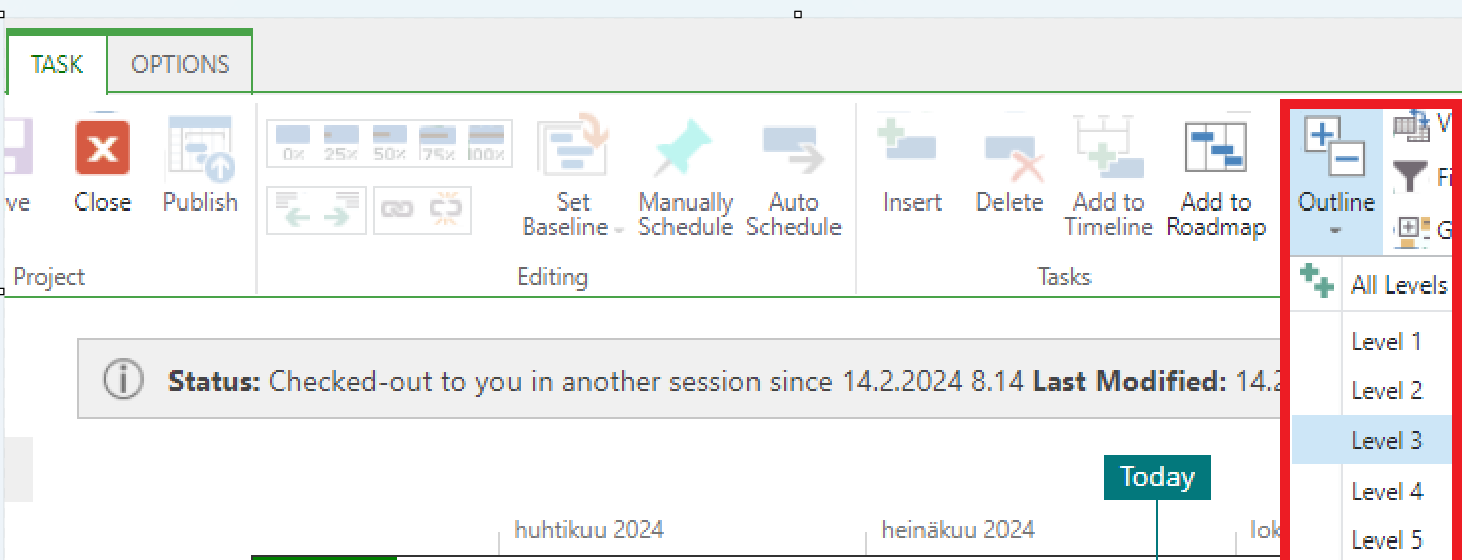
When a project has many tasks, it would be very useful and convenient if one could select the desired hierarchy level to display, e.g., Show Outline Level 1 = main level tasks, and so on.
This same functionality has long been available in the MS Project and Project Online / Project Web App.
E.g.
Show Outline Level 1
Show Outline Level 2
Show Outline Level 3 etc
Show All Levels CourtBodaIron ContributorOr the ability to quickly expand or collapse "All Tasks" would also be a helpful start.
 DenvermartinCopper ContributorHopefully this is a big turnaround for the new planner, because the recent update was half baked and didn't inspire trust or confidence. Issues like not being able to see premium plan tasks in My Day is a huge oversight.
 mentorvrajolliBrass Contributor
...
- mentorvrajolliBrass Contributor
I hope the MS Planner development team considers the following features, which would greatly enhance user experience:
- Integration of all To-Do features into Planner Basic: This should include the ability to set specific notification times (hour/minute), add alarms to the app, automatically recognize due dates and times, and allow tagging of assignees and locations when drafting task descriptions.
- Planner as an alarm clock: Enable Planner to function as an alarm clock, allowing users to set task reminders or alarms at specific times.
- Access to all plan activities: Provide the ability to view all plans you have access to, even if you’re not specifically assigned to tasks.
- Tagging in comments: Allow users to tag specific assignees in task comments for streamlined collaboration. Unlimited checklist tasks and flexible checklist management: Remove the current 20-task limit for checklists. Include features such as grouping checklist tasks (similar to Google Keep) and the ability to convert copied text rows into multiple checklist lines.
- Board view of all plans: Introduce a unified board view that shows all plans you are involved in, not just one plan at a time.
- Calendar integration: Create a more seamless way to sync Planner with calendars, perhaps by offering an option to integrate all plans into the calendar automatically, instead of manually adding each one.
- Custom time-range filter options: Enable customizable time-range filters to allow more control over task and plan views.
- Archiving plans: Add an option to archive completed or inactive plans for better organization, instead of having to delete them.
- Increased task flexibility (similar to Google Keep): Introduce features such as the ability to add photos to tasks, pin tasks, and color-code specific tasks or buckets for better organization and usabili.
- Download task/plan into word document: This option too would be important when it comes to writing narrative progress reports
- Print both individual task and the plan: another feature that could be helpful to use planner more efficiently.
- mherremaIron Contributor
While all of these "when will we get X feature" comments are great, what I'm wondering is: None of these are new requests. People have been asking for years. They feel unheard.
I had very high hopes for the relaunch of Planner, but feel like there was a big opportunity missed. It feels like lipstick on a pig. And a money grab with most of the focus being on Planner "Premium". I'm imagining much of this presentation will feel that way too.
But it's not too late. This thing can be great. And I would gladly be willing to blaze that trail with you all.
So all of this for my question: Will we see meaningful change in the base level of Planner in the next 6 months? No, not on the integration with Pftw. Actual features people have been asking for. Something that prevents people from going to something like Asana or Monday and working around the fact that those tools aren't integrated as well, but are far better project management tools.
Gold star if you give a real, non-political kind of answer. We all know MS has the ability to do this. But should we get our hopes up?
- AndersL1020Copper ContributorLets ask these questions again when the live Q&A starts.
- mherremaIron ContributorAs far as I remember, the comments on YouTube will be disabled just fyi, so there won't be much of a live chat.
 alisondCAREBrass ContributorCould NOT agree more! Has been so frustrating not to be able to do some of the things in Planner folks have been asking to do for a LONG time (@mention team members in comments, sending emails from Outlook into Planner, etc.). There are features like this that should NOT require premium teams if folks are already paying for the O365 licenses that are going to continue to drive more and more folks to other project management platforms.
- mherremaIron ContributorIt's really unfortunate. We struggle to recommend Planner to clients/students all the time because of these gaps. It always feels like we're steering them to something inferior.
- AndersL1020Copper ContributorI have all of these questions as well. Please provide us with a roadmap on Tuesday so we know when we should start to use Planner/Project.
- mherremaIron ContributorHopeful we see good things.
- BeckyH1130Copper ContributorWill there be a better way to create or export a plan on a page, like we have been able to with project desktop - selecting the tasks we want to export/ create a condensed timeline. Also, what do these changes mean for anyone using Project Power App, and don't use the default project for the web environment?