Forum Discussion

Mahesha999
May 03, 2022Copper Contributor
Word directly shows next table number while adding table caption
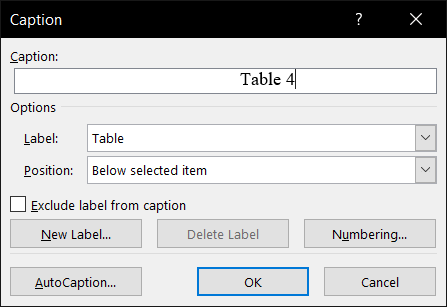
I have a document in two column format. To insert table (or figure), I first insert a textbox and then inside the textbox, I insert a table (or a figure). Then finally, I right click the table (or a ...

May 03, 2022
Almost certainly, the text boxes are not necessary. When you use a text box, it is anchored somewhere in the document and the numerical order assigned to captions is based on the location of the anchor for the text box.
I would recommend that you insert everything so that the layout is "In-line with text".
If you upload a copy of the document, one of use will investigate the issue.
I would recommend that you insert everything so that the layout is "In-line with text".
If you upload a copy of the document, one of use will investigate the issue.

Mahesha999
May 04, 2022Copper Contributor
Thanks for the reply. I just inserted table for Tables and table of Figures in the document. This reveled that some table got multiple captions!! I Just deleted them and recreated their caption and everything started working just fine.
Regarding textbox, I got this Word template from my professor. This is a two column Word template for IEEE papers. However, I also felt that have textbox is unnecessary. So I tried by removing textbox and directly pasting table in-line with text. However, when I tried to insert caption for this table, it used to insert it at very top of the column (not even at the top of table if the table is somewhat middle in the column). So the overall structure was table caption, some text and actual table. However, when I put table and caption inside text box and make that text box in-line with text, it looks perfect. May be that is why the template maker decided to do it that way. Also it may be possible that I am doing something wrong while adding caption to the table (which is not inside textbox). Will give it a try again. But please share your thoughts about caption getting added at the top of the column even though selected to add at the bottom of the image.
Regarding textbox, I got this Word template from my professor. This is a two column Word template for IEEE papers. However, I also felt that have textbox is unnecessary. So I tried by removing textbox and directly pasting table in-line with text. However, when I tried to insert caption for this table, it used to insert it at very top of the column (not even at the top of table if the table is somewhat middle in the column). So the overall structure was table caption, some text and actual table. However, when I put table and caption inside text box and make that text box in-line with text, it looks perfect. May be that is why the template maker decided to do it that way. Also it may be possible that I am doing something wrong while adding caption to the table (which is not inside textbox). Will give it a try again. But please share your thoughts about caption getting added at the top of the column even though selected to add at the bottom of the image.