Forum Discussion

How to setup Templates in Word 365 and Outlook 365
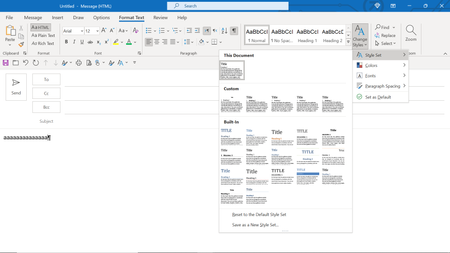

khsayeed In Outlook, create a new message and then go to the Format Text tab of the ribbon and modify the style(s) that you want to use so that they have the desired formatting
and, like in Word, before dismissing the Modify Style Dialog, select the New documents based on this template radio button.
Outlook also has its own template (*.oft) files, each of which can be set up with its own set of styles if required. However to create a message from a particular template, it is necessary to use a macro that contains the command
CreateItemFromTemplate
See https://learn.microsoft.com/en-us/office/vba/api/outlook.application.createitemfromtemplate

Thank you again Doug_Robbins_Word_MVP, for replying to my last post.
Regrettably, I am not a programmer and am not familiar with Visual Basic to be able to use the contents of the link you have provided.
Would you know about the template files with extensions like .dotx and dotm, which were available in Office 2007 (Word 2007 and Outlook 2007) and were used to assign a set of Styles to an existing document (or a new document) which was opened in either of the two applications mentioned above ?
Please let me know where I can find the procedure to accomplish the same objective in Outlook 365 and Word 365 ?
Thanks.
- Nov 26, 2022In Microsoft 365, Outlook has its own editor. By default, the style used for a Message is the Normal style. You can modify that, or any of the available styles in the same way as you modify styles in Word and by setting the option for the modifications to apply to "New documents based on this template", the modified style will apply to all new messages that you create.
While it is not necessary to do so, you can in Word open the NormalEmail.dotm template that you will find in your User Templates folder and make modifications to it in Word. However, the process of making the modifications in Outlook is identical so there is really no reason to do it in Word.- khsayeedNov 26, 2022Copper Contributor2022-11-26
Thank you again Doug_Robbins_Word_MVP, for your reply.
I fear that I have not conveyed to you properly what I am looking for in Word 365 (and in Outlook 365).
Please refer to the following extract from a Microsoft Support website which may clarify the issue for your purposes.
==================================
https://support.microsoft.com/en-us/office/load-or-unload-a-template-or-add-in-program-2479fe53-f849-4394-88bb-2a6e2a39479d#:~:text=Load%20templates%20or%20add%2Dins,-When%20you%20load&text=%2C%20and%20then%20select%20Word%20Options,that%20you%20want%20to%20load.
Load templates or add-ins
When you load a template or add-in, it remains loaded for the current Word session only. If you quit and then restart Word, the template or add-in is not automatically reloaded.
In Word 2010, 2013, or 2016, select File > Options > Add-Ins.
In Word 2007, click the Microsoft Office Button Office button image, and then select Word Options > Add-ins.
In the Manage list, select Word Add-ins, and then click Go.
Click the Templates tab.
Under Global templates and add-ins, select the check box next to the template or add-in that you want to load.
If the template or add-in you want does not appear in the box, click Add, switch to the folder that contains the template or add-in you want, click it, and then click OK.
=================================
I have been able to do the above procedure, but am unable to see the option on a menu item in say Word 365 to attach the template file (say a .dotx file) to an open Word document.
I am unable to attach the screen print of my effort in line with the above. Please let me know how I can send you this on the post, or separately to your email address.- Nov 26, 2022
khsayeed To attach a file or screen shot, click on the Open full text editor link
and you will then see
All Word documents have a template attached to them. If the document was created by selecting the Blank document button, the template will be the Normal template.
If you want to attach another template to a document, go to the Developer tab of the ribbon and click on the Document Template button and then click on the Attach button and browse to the template that you want to attach.
I am not really sure what you are wanting to do, or why you are having difficulty as there is really no change, as far as templates in Word are concerned, between Word 2007 and Word in Microsoft 365.
However, I suggest that you take a look at the following page of the late Shauna Kelly's website.
https://shaunakelly.com/word/templates/attachtemplate.html
Or other pages of Shauna's website that deal with templates.