Forum Discussion

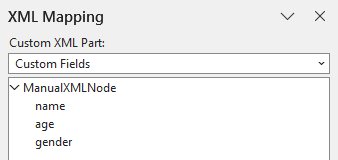
How to add a new field to existing XML Mapping
 Dec 09, 2025
Thank you very much, Charles_Kenyon!
All great contents, they absolutely got me there! What actually got me to the answer was https://learn.microsoft.com/en-us/answers/questions/5029965/xml-location-of-document-properties-in-quick-partsthat%20list%20-%20Sharepoint mensioned in https://addbalance.com/word/MappedControls.htm.
The solution for this is simply explained https://sharepointmaven.com/how-to-add-sharepoint-metadata-to-word-documents-using-quick-parts-document-properties/ as well, which is:- create a SharePoint Team page
- add a Documents Library
- create a Word doc at the library (or upload an existing one as I did)
- add new columns/properties to the Documents Library
- these properties can now be inserted in Word with Quick Parts's Document Properties, keeping the mapping function
- you can also download the file with those properties built-in or make some template from it
That's neat! Better and simpler than what I was expecting.

Project03
As you know your CustomXMLPart Namespace, the easiest way is with VBA:
Sub ScratchMacro()
'A basic Word Macro coded by Gregory K. Maxey
With ActiveDocument.CustomXMLParts.SelectByNamespace("ManualXMLNode").Item(1).DocumentElement
.AppendChildNode "Street_Address"
.AppendChildNode "City"
.AppendChildNode "State"
.AppendChildNode "Zip"
.AppendChildNode "Home_Phone"
.AppendChildNode "Etc."
.AppendChildNode "Etc."
.AppendChildNode "Etc."
End With
lbl_Exit:
Exit Sub
End Sub