Forum Discussion

svohio
Dec 02, 2025Copper Contributor
How do I correct heading numbering?
UPDATE: I couldn't remove this post, after I discovered the issue. Thanks! I need to update heading numbering within an old document. Custom headings were made (as pictured) but I need the headin...
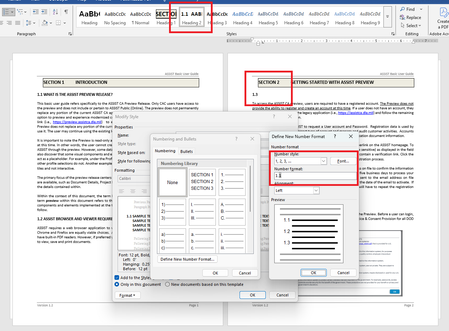
- Dec 03, 2025
Try this:
- Use Built-In Heading Styles
Ensure Word built-in Heading 1, Heading 2, and Heading 3. This is crucial for multilevel numbering to work properly.
- Apply Multilevel List
- Go to the Home tab.
- In the Paragraph group, click the Multilevel List icon.
- Choose “Define New Multilevel List…” at the bottom.
- Configure Each Level
In the dialog box:
- Level 1:
- Number format: Type Section before the number (e.g., Section 1)
- Link level to style: Heading 1
- Number style: 1, 2, 3, ...
- Level 2:
- Number format: Leave as 1.1
- Include level number from: Level 1
- Link level to style: Heading 2
- Number style: 1, 2, 3, ...
- Level 3:
- Number format: Leave as 1.1.1
- Include level numbers from: Levels 1 and 2
- Link level to style: Heading 3
- Number style: 1, 2, 3, ...
Make sure to check “Restart list after” for each level to ensure numbering resets correctly under each parent.
- Apply Styles to Your Document
- Select each heading in your document and apply the correct style (Heading 1, Heading 2, etc.).
- The numbering should now reflect the hierarchy: Section 2, 2.1, 2.1.1, etc.
Number your headings - Microsoft Support


Dec 03, 2025
See the article "How to create numbered headings or outline numbering in your Microsoft Word document" on the following page of the Late Shauna Kelly's website:
http://shaunakelly.com/word/numbering/numbering20072010.html?p=1768
 svohioDec 05, 2025Copper Contributor
Cool, thanks!