Forum Discussion

Can a font become 'corrupted,' and how to replace?
 Apr 05, 2026
UPDATE: IT'S A BUG IN WORD!
Thanks to all who answered. I did reinstall/repair the system fonts, but that didn't do it. However, I found what was corrupting the text, but have no idea why it was.
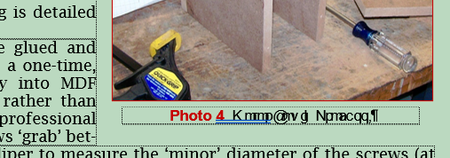
The captions below the pictures are in Text Boxes. What I did was to position the text box below the picture, centering it and butting its top margin against the picture margin for a consistent look. Then I selected the photo, held down Ctrl and also selected the text box, then went up to the ribbon and invoked the Group Objects command... for two reasons. 1) I wanted a common left/right margin for the two so that the body text of the .docx would be a constant distance for both; that is, a straight-line right margin for the body text. 2) I wanted to be sure that if I had to move a picture, the accompanying text box would move with it.
Well, that Group Objects command is what corrupted the text box text. I didn't see the corruption until I had closed and reopened the .docx, and have the feeling that it might have reopened okay for a while, but finally succumbed to whatever ultimately broke with the two merged. Here are screenshots of the very same area, first with the objects grouped, and then ungrouped:What I don't understand is why the file, grouped and 'corrupted,' didn't show up garbled on another computer, or why another font didn't garble when substituted, including the boldface version of the same font. But whatever happens when those are grouped, it's fixed now and I'm happy as the proverbial clam.

Fonts can become corrupted in Windows.
In this case, the issue is most likely a corrupted Arial Regular font file on that specific computer. The most common reason for font becoming corrupted is
Only Arial Regular is affected (bold works fine).
The same file works on another PC → confirms document is NOT the issue.
Garbled text fixes when switching font → confirms font rendering problem.
Fonts can get corrupted due to: Disk errors or Memory issues
Here is the fix to font becoming corrupted:
Method 1: Reinstall the font (Most important)
Go to Control Panel → Fonts
Find Arial
Delete/remove it
Reinstall a fresh copy (or reinstall system fonts)
Method 2: Restore default fonts
Go to:
Control Panel → Fonts → Font Settings
Click Restore default font settings
Method 3: Repair system files
Open Command Prompt (Admin)
Run:
sfc /scannow
This fixes corrupted system fonts
Method 4: Quick Word fix
Run Word in Safe Mode:
winword /safe
Helps identify if add-ins/cache are causing the issue