Forum Discussion

Windows Stopped updating and failed to install updates
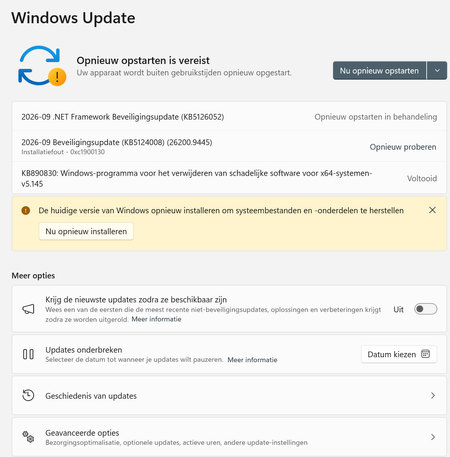

Your screenshots show that the update-based repair and Get Help diagnostic are failing, while DISM reports no component-store corruption. That result does not rule out every setup or servicing problem. Since Windows still starts, an in-place repair using official installation media is a supported next option that can preserve applications and files. Back up important data and your BitLocker recovery key first. Obtain media matching your installed language and edition, open it from within the running Windows installation, and launch setup.exe. At the confirmation screen, verify that Keep personal files and apps is selected. Stop if that option is unavailable; do not continue with Keep nothing or boot from the USB for this preservation goal. If setup also fails, record the exact error and retain its setup logs for diagnosis. This is still a Windows reinstallation, but it is different from wiping the computer or resetting away your applications.
 MichplaySep 12, 2026Tin Contributor
an update on the situation, i tried the boot from usb with the iso file and did the self repair that failed and did the: Uninstall latest quality update or Uninstall latest feature update options, but both failed to uninstall. i wanted to override windows with keeping the data but it showed the programs i would lost that are installed and that is basically reinstalling windows without keeping data even though it said in the option that i would keep the data. what if i make an image of my pc now and reinstall and install the image. would it then have the same fault state it is in now or wil it override, meaning it wil keep the system files that it has in a new state and override the old state of the system with adding the new state files or will it wipe the system again ?