Forum Discussion

Windows Security hangs on Full Scan?
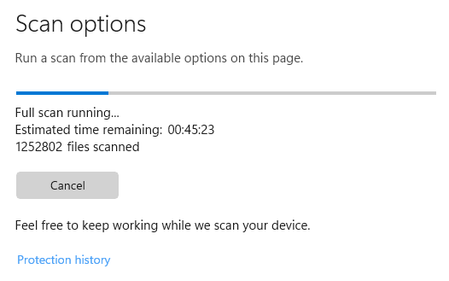

I reckon it's been like this for a month now? Quick Scans and the automatic background scan run and report their findings fine.
I'll check out your link and report back, thank you!

Hope you are doing well, I wish to help you with this issue!
Wondering if you are able to run a Windows Offline Scan and if it works?
Are all your Security Updates in order and Windows is all up to date?
https://support.microsoft.com/en-us/windows/help-protect-my-pc-with-microsoft-defender-offline-9306d528-64bf-4668-5b80-ff533f183d6c#:~:text=How%20do%20I%20use%20Microsoft%20Defender%20Offline%201,Defender%20Offline%20scan%2C%20and%20then%20select%20Scan%20now.
Thank you!
God bless,
Shawn
- slipdSep 04, 2023Brass Contributor
Deleted Reza_Ameri so weird... I just completed a Full Scan successfully with Malwarebytes Premium also running in the background. I was also actively using my PC; web browsing, Spotify and a bit of file copying. I'm not really sure what could have caused the scan to be successful? Could it be a Windows 11 power usage thing? - because like I said before, I would always come back to a hung scan if the PC had become idle etc. My rig never sleeps but the system does lock after 10 minutes of inactivity I think. I know the monitor sleeps after 20 minutes.
I think I need to do some more testing but I don't think anything is broken as such? - which is a good thing

 Reza_AmeriSep 04, 2023Silver ContributorThank you for the update, please do the scan and tell us about your findings.
- DeletedSep 04, 2023Not applicableDid you set the settings to not put it to sleep in windows and run the offline scan?
- slipdSep 09, 2023Brass Contributor
Deleted no, no changes to power management, but I was continually using my PC whilst the scan took place.
I still haven't looked at the Offline Scan.