Forum Discussion

Windows License Will Not Transfer to New Motherboard
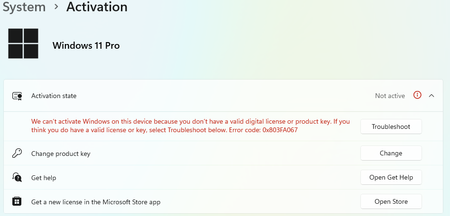

You replaced the motherboard, reinstalled Windows 11 Pro, and the Activation troubleshooter cannot find the linked device. A motherboard change creates a new hardware identity, so linking a digital license to a Microsoft account helps reactivation but does not make every license transferable. Verify that the new installation is Windows 11 Pro and that you are an administrator signed in with the same Microsoft account. Open Settings, System, Activation, Troubleshoot, choose “I changed hardware on this device recently,” and select the old device if it appears. If it remains absent, confirm how Windows was purchased. A transferable retail license can normally move after removal from the old device; an OEM license supplied with a computer is generally tied to that device. Do not publish the key or installation ID. Keep the purchase receipt and contact Microsoft activation support, because only they can validate and reassociate an eligible entitlement.
 NotHappyCustomerOct 23, 2026Copper Contributor
His license is retail. So is mine. Purchased directly from Microsoft and both licenses now I switched them between my pcs being one home one pro and fresh installs will not activate. Same dead ends as the op. Complete fail on Microsofts behalf. Paid premium price and now lost about $600. Should have bought a shady $20 key off one of those websites.
 josephasheSep 09, 2026Copper Contributor
Was this copy-pasted, my post verifies over half of this reply. Thanks for the suggestions; if you could kindly guide me on how to 'contact microsoft activation support', that'd be the most helpful thing anyone has done.
my above reply has a screenshot of cmd > slmgr-dli , confirming it is retail.