Forum Discussion

Kizzume
May 30, 2025Tin Contributor
Windows is no longer creating new thumbnail images
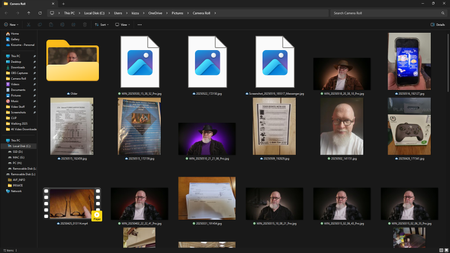
Windows is no longer creating new thumbnail images for pictures. They'll show for a split second, and then get immediately replaced with a generic icon. What gives?

Jun 01, 2025
It is often caused by corrupted thumbnail cache.
Make sure Windows is set to show thumbnails, not icons:
Open File Explorer > View > Options > Uncheck "Always show icons, never thumbnails" > OK/Apply.
Open Run menu and copy-paste cleanmgr and hit the Enter key.
Select C Drive.
Select Thumbnails and click OK.
Restart your PC.
You may also open Command Prompt as Admin and copy-paste the following commands:
taskkill /f /im explorer.exe
del /f /s /q /a %LocalAppData%\Microsoft\Windows\Explorer\thumbcache_*.db
start explorer.exe