Forum Discussion

Windows 11 upgrade download stops at 8% then goes back to update screen

I don't believe so - at the time it was moved from MBR to GPT. DISM Fine, sfc /scannow fine. Other windows updates installing fine.

 Ian MannJul 28, 2022Copper Contributor
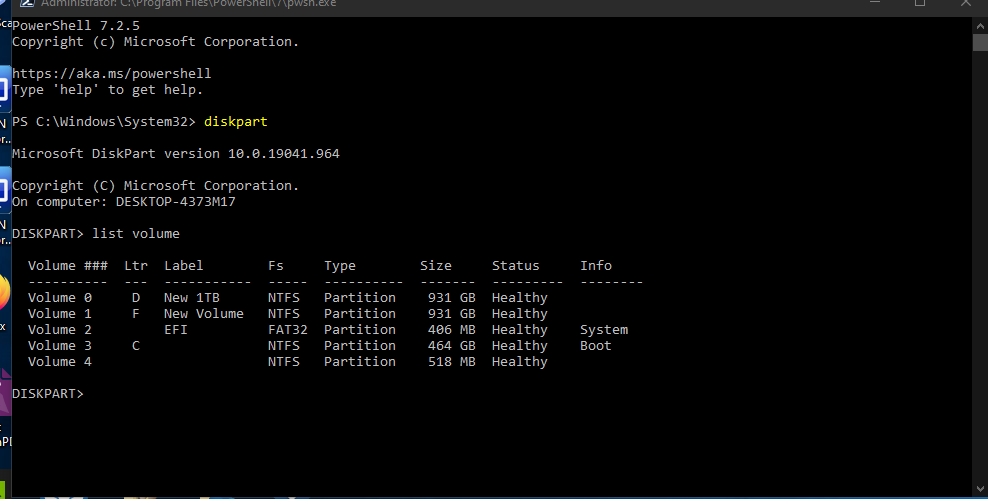
get error - CHostIsUEFICompliantChecker failed. [Failed to check whether host has UEFI disk layout.] HRESULT = 0x80070003[gle=0x00000001]
But C: drive IS GPT and UEFI and system information says BIOS Mode UEFI.- Ian MannJul 04, 2022Copper ContributorNo extenal drives - have a web cam, disconnected that and it made no difference.
- AnonymousJul 04, 2022
Surely you have external drives connected, or other devices permanently to your computer -> it looks like disconnecting this, restarting and trying to update has a chance of success.
- Ian MannJul 04, 2022Copper ContributorThanks - The PC is on 24/7 except for some restarts occassionally.
- AnonymousJul 04, 2022sometimes restarting your computer every 2 hours can help.
- Ian MannJul 04, 2022Copper ContributorI just think that my version of Windows 11 is not ready yet.
- Ian MannJul 04, 2022Copper ContributorAll drivers are up to date. Updates from store for most apps/software.
- AnonymousJul 04, 2022
Do you download updates for apps directly from the Microsoft Store?
Have you downloaded the latest drivers from your PC manufacturer's website? - Ian MannJul 03, 2022Copper Contributor
Deleted Defender Tampering Restore Removed
- AnonymousJul 03, 2022
Hi Ian Mann
https://www.microsoft.com/security/blog/2012/11/15/microsofts-free-security-tools-microsoft-safety-scanner/#:~:text=The%20Microsoft%20Safety%20Scanner%20is%20a%20free%20stand-alone,with%20the%20latest%20signatures%2C%20updated%20multiple%20times%20daily.
Please do a full scan with this Microsoft product, write if anything detected?
- Ian MannJul 02, 2022Copper Contributor
It is July 3rd now and the issue still remains, download stops at 8% for "windows 11 upgrade" via windows update, "some files missing" message still displays. Tried all the solutions suggested. Don't want to put a new c drive in and do aclean install and lose all my apps.
- ansus2190Apr 29, 2022Copper Contributor
Thanks for the replies and advice. I will just need to wait.
Edition Windows 10 Pro
Version 21H2
Installed on 12/11/2019
OS build 19044.1620
Experience Windows Feature Experience Pack 120.2212.3920.0Device name DESKTOP-4373M17
Processor AMD Ryzen 7 5800X 8-Core Processor 3.80 GHz
Installed RAM 32.0 GB
Device ID FFCAC22C-9D00-47BD-8086-7FDA5045846A
Product ID 00330-71469-16508-AAOEM
System type 64-bit operating system, x64-based processor
Pen and touch No pen or touch input is available for this display - AnonymousApr 29, 2022I understand, sometimes it is worth waiting - further updates will remove conflicts and will be
well!
Best regards - ansus2190Apr 28, 2022Copper ContributorHad a read, I feel that it is beyond my capability to perform it safely.
- AnonymousApr 28, 2022
https://support.microsoft.com/en-GB/topic/how-to-perform-a-clean-boot-in-windows-da2f9573-6eec-00ad-2f8a-a97a1807f3dd
- ansus2190Apr 28, 2022Copper ContributorHow do I perform a "clean Boot"?
- AnonymousApr 28, 2022A clean boot - it runs only the necessary applications and try to download the update
- ansus2190Apr 28, 2022Copper Contributor
Have tried with Acronis removed. Still the same result. It is looking more like a "clean install" is the answer and not an "inplace upgrade" . I dread losing all my data and purchased software and email encryption keys. So angry with Microsoft for this Windows 11 debacle.
- AnonymousApr 28, 2022ACRONIS ->if it is still installed, I believe that this is one of the applications with the highest privileges
- ansus2190Apr 28, 2022Copper Contributor
see that other updates are installing successfully.
- ansus2190Apr 28, 2022Copper Contributor
what software do you mean to uninstall???? Remember it doesn't even download the update, stops download at 8%, install never commenced.
- AnonymousApr 28, 2022Please uninstall this software perhaps the update will succeed!
- ansus2190Apr 28, 2022Copper ContributorACRONIS is my software for backup.