Forum Discussion

Windows 11: System Clock Losing Exactly 7 Minutes per Day
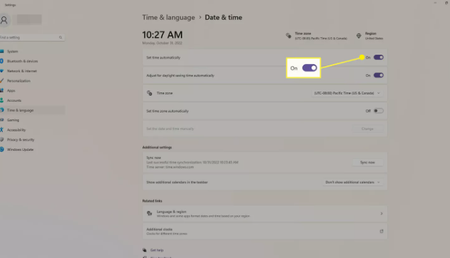

Seven minutes per day is far beyond normal clock drift. First separate a Windows Time issue from the hardware clock: shut down, enter the BIOS/UEFI before Windows starts, record its time, then check it again after the PC has been off for several hours. If that clock is also slow, update the firmware and ask the device maker to check the RTC/CMOS battery.
If the BIOS/UEFI time stays correct, open Terminal as administrator and run:
w32tm /query /status
w32tm /query /configuration
w32tm /resync
Check the reported source, last successful sync, and any error. Also confirm the time zone and “Set time automatically” under Settings > Time & language > Date & time. On a work-managed PC, don’t replace the time source manually because domain policy may control it.
Finally, inspect Event Viewer > Applications and Services Logs > Microsoft > Windows > Time-Service > Operational. Note whether the clock drifts gradually or jumps at a specific time. Is this a physical PC or a virtual machine?