Forum Discussion

DavidR_DYMO
Jan 07, 2022Copper Contributor
Windows 11 Printer Issue - DYMO LW450 DUO is not installing correctly/entirely
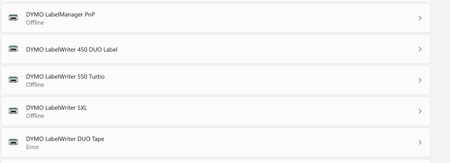
This issue occurs in Windows 11 The expected result is that both DYMO LW450 DUO Label and LW450 DUO Tape install correctly, however only the LW450 DUO Label installs while the LW450 DUO Tape's sta...

cristina1600
Nov 13, 2023Copper Contributor
DRonski Windows11 was just installed on my laptop. The DYMO printer app will open and then close. I uninstalled and reinstalled the label printer app.
- I tried installing https://www.catalog.update.microsoft.com/Search.aspx?q=KB5026446 suggested by SchuelerJB but got the same pop-up that Horrgakx1530 mentioned "This update is not applicable to your computer"
- I tried a different USB port as suggested, but the app opens and immediately closes as before
DavidR_DYMO What other protips are out there?

larrylag
Nov 13, 2023Copper Contributor
I know this doesn't address ur problem directly but may be worth giving it a try. I've tried this when I have had issues getting both printers to work on my win 11. I have a Duo 400 not a 450. Try it with printer on and connected to USB port. Preferably USB 2.
Windows key + R and type in services.msc and press Enter
Find “Print Spooler” Right-click on it and select “Restart”
If it doesn't work try it with the printer disconnected.
Windows key + R and type in services.msc and press Enter
Find “Print Spooler” Right-click on it and select “Restart”
If it doesn't work try it with the printer disconnected.