Forum Discussion

Windows 11 Printer Issue - DYMO LW450 DUO is not installing correctly/entirely
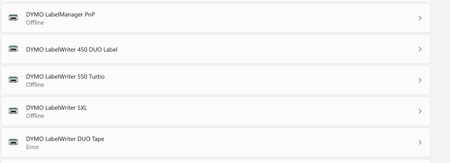


Thats how it works. The first 2 try's the tape printer went offline after a restart and there was no way to activate it. But anyway, on the third try it worked. Now both printers are working with the Dymo Label Software v.8.7.4.48936. And in case it won't work after an update, I just run the migration again.
- megatech1966Dec 13, 2022Copper Contributor
My Dymo Print Server arrived. Setup it up. Works well. Restarted and tested again. Still works.
 StevieC-D_UKDec 09, 2022Copper Contributor
1. install the Dymo Label Software v.8.7.4.48936 and the Dymo Connect Software 1.3.2.18 on a win10 machine with a win10 version earlier than KB5015807. Then connect the printer and check if its working with the Dymo Label Software. BTW it didn't work with the Dymo Connect Software.
NO NO NO NO NO STOP
Microsoft should have this sorted by now, not us lot doing work arounds. The easiest option is go back to Windows 10
 larrylagDec 08, 2022Copper Contributor
TonmichelI partitioned my HD and installed win 10 on second partition. Removed most apps from win 11 partition and minimized memory on that partition. I'm keeping win 11 around just in case I want to go back to it but there is not much I like about win 11. I equate it to Vista 2.0. Installed the apps on win 10 to include Dymo using S/W Label Software v. 8.5.4 as recommended by my Dymo contact. My printer is Dymo LW400 not LW450 like most of u have. The tape didn't work at first so I did the regedit procedure and both tape an label worked. After multiple reboots both still are working. So far so good.
- TonmichelDec 08, 2022Copper Contributorwin10 21H2 is the correct system, but the important thing is, that the patch KB5015807 is not installed. It is responsible for crashing the drivers and the ability for windows to connect two different devices to one USB port (assign to virtual ports)
- TrevorBuleyDec 07, 2022Copper ContributorHow is this still an issue?
Win10 Enterprise 22H2 with latest patching, Dymo Duo only ever shows the Label printer.
Manually adding Tape just gives Error.
Just for fun I also tried 21H2 with the same issue. - TonmichelDec 06, 2022Copper ContributorOK, now step by step...
1. install the Dymo Label Software v.8.7.4.48936 and the Dymo Connect Software 1.3.2.18 on a win10 machine with a win10 version earlier than KB5015807. Then connect the printer and check if its working with the Dymo Label Software. BTW it didn't work with the Dymo Connect Software.
2. export the drivers via the console with printing management (migration) to a USB Device
3. migrate the drivers via the console to your win11 machine (make sure that there is no Dymo software installed)
4. connect your printer search for it in the printing managment. Now you should find Dymo Labelwriter 450 Duo Label AND Dymo Labelwriter 450 Duo Tape. Choose Label and make a test print, then choose Tape and make a test print. It should work now.
5. Install the Dymo Label Software v.8.7.4.48936 and everything should work fine now.
6. I your computer needs to be restarted, don't do so.... never make a restart, because that kills the drivers. I set my computer to quick start. If it needs to restart, I shutdown and start again, but never do a restart. If the computer is set to quick start it seems that it doesn't check the drivers in the start sequence.
hope that works for you all... - megatech1966Nov 28, 2022Copper ContributorI’ve given up waiting for a fix. I’ve just ordered a dymo print server for $187.63 aud
- carlo143Nov 28, 2022Copper ContributorI give up again and thank ICEPIQUE for its helpful support but no matter what I do the TAPE printer always remains offline and can only work with the label printer .....
- megatech1966Nov 27, 2022Copper Contributor
Tonmichel how to I migrate the Windows 10 drivers. Is there a tutorial available?
