Forum Discussion

DavidR_DYMO
Jan 07, 2022Copper Contributor
Windows 11 Printer Issue - DYMO LW450 DUO is not installing correctly/entirely
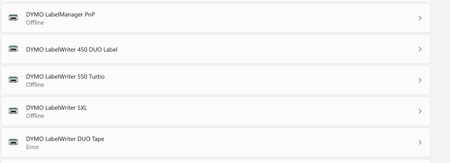
This issue occurs in Windows 11 The expected result is that both DYMO LW450 DUO Label and LW450 DUO Tape install correctly, however only the LW450 DUO Label installs while the LW450 DUO Tape's sta...

JoeriSw
Oct 04, 2022Brass Contributor
Hmm not sure why it's not working for you. During the registry steps i deleted everything Dymo related (not just the labelwriter).
What program are you using to print? Dymo Connect or Dymo Labelwriter?
I'm using Dymo Connect version 1.4.3.131
What program are you using to print? Dymo Connect or Dymo Labelwriter?
I'm using Dymo Connect version 1.4.3.131

Horrgakx1235
Oct 04, 2022Copper Contributor
I have some great news!!
- I have updated Win11 to 22H2 [22621.525] using the Windows 11 Install tool (note to others - Windows Update DOES NOT pick up the 22H2 update!!)
- I have run Windows Update which installed a cumulative update
- I have uninstalled the printer drivers, including any registry entries relating to Dymo (where I could
I can confirm that although the label printer works, also, now, amazingly, the tape printer DOES WORK!! :))))
 larrylagOct 04, 2022Copper Contributoryes
 IngoM56Oct 04, 2022Copper ContributorI followed the instruction, too. After that, both printers work, but only for one time.
After a reboot, the tape driver goes to error, again.- megatech1966Oct 04, 2022Copper ContributorHave you done a reboot?
- JoeriSwOct 04, 2022Brass ContributorAh great news!
Maybe it was the last update that you needed 🙂 (or deleting every registry DYMO related)
anyway good that it works!!
I did not perform a restart yet though so i hope it still works after a reboot.
