Forum Discussion

Windows 11 Printer Issue - DYMO LW450 DUO is not installing correctly/entirely
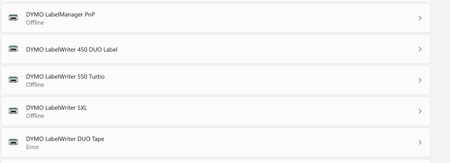

Hi IngoM56 , thank you for sharing this workaround. I hope this will be of use to other users.
As of right now the DYMO developers aren't aware of improvements we can make to resolve these Windows 11 printer driver issues. At it's core, it's caused by the way Windows 11 handles these printer drivers.
If anyone at Microsoft sees this and has feedback for the DYMO team or an update on the status of the work on this issue, please reach out to me via this platform. I'll be sure to revisit the thread. Thank you.

same problem.... hope there is a solution soon
- megatech1966Dec 13, 2022Copper Contributor
My Dymo Print Server arrived. Setup it up. Works well. Restarted and tested again. Still works.
 StevieC-D_UKDec 09, 2022Copper Contributor
1. install the Dymo Label Software v.8.7.4.48936 and the Dymo Connect Software 1.3.2.18 on a win10 machine with a win10 version earlier than KB5015807. Then connect the printer and check if its working with the Dymo Label Software. BTW it didn't work with the Dymo Connect Software.
NO NO NO NO NO STOP
Microsoft should have this sorted by now, not us lot doing work arounds. The easiest option is go back to Windows 10
 larrylagDec 08, 2022Copper Contributor
TonmichelI partitioned my HD and installed win 10 on second partition. Removed most apps from win 11 partition and minimized memory on that partition. I'm keeping win 11 around just in case I want to go back to it but there is not much I like about win 11. I equate it to Vista 2.0. Installed the apps on win 10 to include Dymo using S/W Label Software v. 8.5.4 as recommended by my Dymo contact. My printer is Dymo LW400 not LW450 like most of u have. The tape didn't work at first so I did the regedit procedure and both tape an label worked. After multiple reboots both still are working. So far so good.
 TonmichelDec 08, 2022Copper Contributorwin10 21H2 is the correct system, but the important thing is, that the patch KB5015807 is not installed. It is responsible for crashing the drivers and the ability for windows to connect two different devices to one USB port (assign to virtual ports)
- TrevorBuleyDec 07, 2022Copper ContributorHow is this still an issue?
Win10 Enterprise 22H2 with latest patching, Dymo Duo only ever shows the Label printer.
Manually adding Tape just gives Error.
Just for fun I also tried 21H2 with the same issue. - TonmichelDec 06, 2022Copper ContributorOK, now step by step...
1. install the Dymo Label Software v.8.7.4.48936 and the Dymo Connect Software 1.3.2.18 on a win10 machine with a win10 version earlier than KB5015807. Then connect the printer and check if its working with the Dymo Label Software. BTW it didn't work with the Dymo Connect Software.
2. export the drivers via the console with printing management (migration) to a USB Device
3. migrate the drivers via the console to your win11 machine (make sure that there is no Dymo software installed)
4. connect your printer search for it in the printing managment. Now you should find Dymo Labelwriter 450 Duo Label AND Dymo Labelwriter 450 Duo Tape. Choose Label and make a test print, then choose Tape and make a test print. It should work now.
5. Install the Dymo Label Software v.8.7.4.48936 and everything should work fine now.
6. I your computer needs to be restarted, don't do so.... never make a restart, because that kills the drivers. I set my computer to quick start. If it needs to restart, I shutdown and start again, but never do a restart. If the computer is set to quick start it seems that it doesn't check the drivers in the start sequence.
hope that works for you all... - megatech1966Nov 28, 2022Copper ContributorI’ve given up waiting for a fix. I’ve just ordered a dymo print server for $187.63 aud
- carlo143Nov 28, 2022Copper ContributorI give up again and thank ICEPIQUE for its helpful support but no matter what I do the TAPE printer always remains offline and can only work with the label printer .....
- megatech1966Nov 27, 2022Copper Contributor
Tonmichel how to I migrate the Windows 10 drivers. Is there a tutorial available?
- TonmichelNov 27, 2022Copper ContributorI would like to thank ICEPIQUE for the idea of migrating the printers from a win10 machine.
Thats how it works. The first 2 try's the tape printer went offline after a restart and there was no way to activate it. But anyway, on the third try it worked. Now both printers are working with the Dymo Label Software v.8.7.4.48936. And in case it won't work after an update, I just run the migration again. - StevieC-D_UKNov 27, 2022Copper Contributor
Just tried, reinstalled the DYMO soft wear 1.4.3.131 and I'm running Windows 11 22H2
Still not working

 MichekCNov 27, 2022Copper Contributor
megatech1966 cool. But still no work on Windows with the current workaround of Dymo after the restart.
- megatech1966Nov 26, 2022Copper Contributor
My works now!!!
That didn’t take Microsoft long to fix that. Jk
- AlainCH66Nov 26, 2022Copper Contributor
According to the information contained in the note:
https://winaero.com/microsoft-has-removed-two-upgrade-blocks-for-windows-11-22h2/
fixed some bugs that also affect printers.
Finally, after the last update of my version of Windows 11 Professionnel Insider Preview 25247.1000
My DYMO LabelWriter 450 DUO printer Label & Tape works perfectly again.
Good luck to you...
- ICEPIQUENov 23, 2022Copper ContributorYou need to create the migration file from a mashine with a succesfull driver installation.
- carlo143Nov 23, 2022Copper ContributorThanks
German is perfect come from Baden Württemberg 🙂
I'll test that and report back - ICEPIQUENov 23, 2022Copper Contributor
Yes, both printers are there, even after a restart.
Best description I found is in german, hope you can handle that 😉
https://itler.net/drucker-treiber-und-einstellungen-unter-windows-exportieren-und-importieren/ - ICEPIQUENov 23, 2022Copper Contributor
Got Tape and Label Printer working on WIN11!
I followed the steps discribed in an older post from Tonmichel (replied to DavidR_DYMO - Oct 19 2022 10:20 PM) on a WIN10 machine.
Then I migrated the printers (Tape and Label) via mmc printer management in a migation file.
After that, I imported the migrated printers into the WIN11 machine.
That´s all - both printers are in duty again. - larrylagOct 25, 2022Copper ContributorHere is some info from older post:
Jul 15 2022 08:53 AM
We have also experienced this issue but on Windows 10 machines. We have found that it has been caused by the update KB5015807. Uninstalling that and rebooting resolved the issue. We had this at multiple companies and users that we support and this worked for all of them.
Yes, you can solve it by uninstalling the last windows update KB5015807. This patch broken the virtual port used for this model. - larrylagOct 10, 2022Copper ContributorLike u I am a casual user and can't see spending $150 for a DYMO print server or buying a Brother label printer for $300. And ur right, it is ridiculous.
- larrylagOct 10, 2022Copper ContributorI gave up on my PC with win 11 and put it back on my wife's PC with win 10 where it use to work. BTW my printer is a duo 400 not a 450. I forgot I had done updates on her pc which was a mistake. Well anyway could not get the tape to print. So I went through the cabooky dance. At first it didn't work but after a few minutes all of a sudden it printed several tape labels in the Q..
 JoeriSwOct 09, 2022Brass Contributor
To come back on my latest comment;
When i started my laptop today it suddenly started printing Tape labels i had tried printing last week.
Guess they were still in the queue.. But now both tape and label are both working again.
I'm afraid to reboot again though.
I'll let you know if it still works tomorrow. Maybe the trick is to have something in your queue on boot lol...

